

Smart classroom solutions often underperform for a simple reason
Many Smart classroom solutions fail to deliver expected results not because the technology is weak, but because planning, integration, and execution are often misaligned with real project goals. For project managers and engineering leads, understanding this gap is essential to avoiding budget waste, rollout delays, and poor user adoption. This article explores the practical reasons behind underperformance and what decision-makers can do to improve outcomes.
For project-driven teams, a checklist-based approach works better than a feature-first discussion. In most deployments, underperformance does not come from one dramatic failure; it comes from several small decisions that were never validated early enough. Smart classroom solutions usually involve hardware, software, networking, building constraints, procurement timing, training, and long-term support. If even one of these layers is treated as an afterthought, the full system may look impressive on paper while disappointing in actual teaching use.
That is why project managers should evaluate Smart classroom solutions through key checkpoints: objective clarity, infrastructure readiness, workflow fit, integration depth, adoption planning, and measurable outcomes. The goal is not to buy more technology. The goal is to ensure that every component supports learning, simplifies operation, and remains reliable over the project lifecycle.
Start here: the first checks before approving Smart classroom solutions
Before comparing vendors or devices, decision-makers should confirm whether the project brief defines success in operational terms. A surprising number of Smart classroom solutions are selected based on demonstrations, not deployment realities. When that happens, procurement moves faster than design validation, and the result is mismatch.
- Confirm the primary outcome. Is the project intended to improve hybrid instruction, increase classroom control, support active learning, standardize rooms across campuses, or reduce support burden?
- Define who must use the system daily. Teachers, IT teams, students, facilities staff, and external support providers often need different things from the same room.
- Check whether performance metrics are measurable. Examples include uptime, session start time, teacher adoption rate, helpdesk ticket reduction, or utilization of collaboration tools.
- Identify the non-negotiables early. Budget ceiling, construction schedule, interoperability requirements, and data security rules should be documented before solution design.
- Clarify whether the project is a pilot, a phased rollout, or a standardization program. Each path requires different design decisions and different risk tolerance.
If these checks are unclear, even well-known Smart classroom solutions can underperform because the project is solving the wrong problem or solving the right problem in the wrong way.
Core checklist: why Smart classroom solutions underperform in real projects
1. The design is technology-led instead of use-case-led
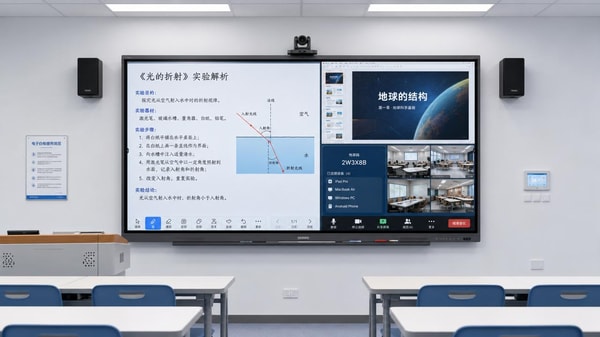
One of the most common reasons Smart classroom solutions fail is that specification begins with devices rather than classroom behavior. A room may include interactive displays, lecture capture, wireless sharing, sensors, and control panels, yet still frustrate users if the teaching sequence is not considered. Project leaders should map what actually happens in the room from entry to exit: startup, source switching, annotation, remote participation, content saving, and shutdown. If the workflow feels complicated, adoption will drop.
2. Legacy infrastructure is underestimated
Many Smart classroom solutions are expected to run on networks, power layouts, acoustics, and building conditions that were never designed for them. Poor Wi-Fi density, unstable switching, limited power points, HVAC noise, and weak cable planning can all reduce system performance. Engineering leads should conduct site-level verification rather than rely on generic assumptions. Infrastructure gaps often create hidden costs later in the project.
3. Integration is partial, not complete
A classroom may contain strong individual components that do not behave like one system. Cameras, microphones, interactive boards, learning platforms, control interfaces, and scheduling tools must work together consistently. When Smart classroom solutions are only partially integrated, users face login friction, switching delays, audio issues, or duplicated steps. This is especially risky in hybrid or multi-campus environments where consistency matters more than isolated feature strength.
4. Training is treated as a final step
Underperformance often has less to do with equipment quality and more to do with low confidence among end users. Teachers may avoid advanced functions if they fear delays in front of students. Support teams may only know basic troubleshooting. Smart classroom solutions need role-specific enablement: quick-start guidance for instructors, deeper admin training for technical teams, and escalation paths for recurring issues.
5. Procurement logic ignores lifecycle reality
Selecting Smart classroom solutions by lowest upfront cost can create long-term inefficiency. Decision-makers should compare not just purchase price, but maintenance complexity, firmware management, spare parts availability, vendor responsiveness, software licensing, and scalability. A cheaper system that requires frequent intervention may be more expensive over three years than a well-supported solution with higher initial cost.
A practical evaluation table for project managers
Use the following judgment criteria when reviewing Smart classroom solutions during planning, tendering, or pre-deployment assessment.
Different project scenarios require different Smart classroom solutions priorities
Not every environment should evaluate Smart classroom solutions in the same way. The right priorities depend on room use, deployment scale, and operational maturity.
For new construction or major renovation
The biggest opportunity is early coordination. Smart classroom solutions perform better when AV, IT, electrical, furniture, and acoustics are aligned during design rather than patched later. Project leaders should insist on coordinated drawings, device placement simulation, and commissioning standards before procurement locks in.
For retrofit projects
Retrofits demand realism. Existing room dimensions, ceiling conditions, cable routes, and structural constraints may limit ideal design. Here, the best Smart classroom solutions are not always the most advanced; they are the ones that deliver reliable improvement within the physical constraints of the site.
For multi-site standardization
Consistency becomes critical. Project managers should prioritize standard control logic, repeatable support processes, remote monitoring, and approved component lists. Smart classroom solutions that vary too much from room to room increase training time and support complexity.
For pilot programs
A pilot should test assumptions, not just showcase features. Strong pilot design for Smart classroom solutions includes baseline metrics, user observation, failure logging, and a decision framework for scale-up. Without these, the pilot generates enthusiasm but little operational evidence.
Commonly overlooked items that weaken project outcomes
- Room acoustics are not tested until late, causing poor remote participation and low recording quality.
- User interface design is too complex, forcing instructors to depend on technicians or avoid key functions.
- No ownership is assigned for software updates, device health monitoring, or warranty tracking.
- Procurement documents describe equipment but not acceptance criteria, making performance disputes harder to resolve.
- Success is measured at installation handover rather than after several months of live teaching use.
- Cybersecurity, access control, and privacy compliance are reviewed too late, delaying activation.
These missed details explain why Smart classroom solutions can appear complete from a delivery perspective yet still fail from an operational perspective. For engineering project leaders, these are not minor issues; they directly affect ROI, user trust, and future rollout approval.
Execution advice: how to improve Smart classroom solutions performance from the start
A better outcome usually comes from better sequencing. Instead of moving straight from concept to procurement, use a staged execution path.
- Run discovery workshops with teaching users, IT, facilities, and project stakeholders to align objectives and operational pain points.
- Create a room typology matrix so Smart classroom solutions are mapped to actual room categories rather than treated as one-size-fits-all.
- Define technical standards and acceptance tests before issuing tenders, including audio clarity, source switching speed, control response, and conferencing reliability.
- Use pilot feedback to revise interface design, support procedures, and training content before broad deployment.
- Plan post-launch measurement at 30, 90, and 180 days to verify that Smart classroom solutions are producing practical gains, not just successful installation records.
Questions to ask vendors and internal teams before moving forward
To reduce project risk, decision-makers should ask structured questions instead of relying on broad marketing claims around Smart classroom solutions.
Ask vendors how their solution performs in rooms similar to yours, what integration limits exist, how updates are managed, what support response times are realistic, and how user training is delivered at scale. Ask internal teams whether current networks can support the expected traffic, whether facilities can maintain the physical environment, and whether support ownership is agreed across departments. If the answers are vague, the deployment risk is already visible.
Final takeaway for project managers and engineering leads
Smart classroom solutions often underperform for a simple reason: the project treats technology as the answer before validating the operating model. For project managers, the most effective response is a disciplined checklist approach that connects educational use, technical readiness, integration depth, support planning, and measurable outcomes. Better performance usually does not require more complexity. It requires tighter alignment.
If your organization is preparing to evaluate or scale Smart classroom solutions, the most useful next step is to gather a clear room inventory, workflow requirements, infrastructure status, integration expectations, rollout timeline, and budget boundaries. Once those inputs are organized, it becomes much easier to compare solution paths, control risk, and choose a deployment model that delivers reliable long-term value.
Recommended News
 China’s First Embodied AI Robot Export Liability Insurance Launched in GuangxiEmbodied AI Robot Export Liability Insurance launched in Guangxi—China’s first insurer-backed solution for EU/Japan-bound industrial & service robots. Boost compliance, trust & tenders now.
 Morocco: 4th Top African Recipient of EU Energy Aid, Boosting China’s PV & Storage ExportsMorocco’s EU energy aid boost unlocks opportunities for Chinese PV mounting structures & containerized energy storage exports—act now to leverage new regulatory advantages.
 Industrial Robot Controller Thermal Gel: China's Export-Ready Heat Dissipation SolutionIndustrial Robot Controller Thermal Gel: China’s export-ready, TÜV-certified heat dissipation solution (8.5 W/mK) for robotics in SEA & Mexico.
 ADB Raises Vietnam’s 2026 GDP Forecast to 7.2% on Sino-Vietnam Supply Chain IntegrationADB raises Vietnam’s 2026 GDP forecast to 7.2% amid deepening Sino-Vietnam supply chain integration in electronics, solar PV, and lithium battery PACK production — key insight for OEMs, exporters & integrators.
 First National SME Service Demonstration Platforms AnnouncedFirst National SME Service Demonstration Platforms announced—16 specialize in REACH, UKCA, UL certification & rapid factory audits for exporters.
 U.S. Natural Gas Inventory Growth Below Forecast: Impact on Plastic Export CostsU.S. natural gas inventory growth missed forecast—impacting plastic export costs globally. Learn how rising TTF prices affect PP/PE resin costs, margins & supply chain strategy for exporters.
 EN 62368-1:2026 Enforced in EU: Thermal Runaway Protection for Wearables & Smart Home DevicesEN 62368-1:2026 is now mandatory in the EU—learn how thermal runaway protection impacts wearables, smart home devices & EV accessories.
 Q1 2026 Industrial Profits Up 15.5%: Supply Chain Cost Stability ConfirmedQ1 2026 Industrial Profits Up 15.5% — supply chain cost stability confirmed for global procurement, contract manufacturing & OEM teams.
") MIIT Releases Service Trade Standardization Plan (2026–2030)MIIT's 2026–2030 Service Trade Standardization Plan boosts AI-driven digital services—remote QA, cloud maintenance, intelligent warehouse SaaS—for global export competitiveness.
MIIT Releases Service Trade Standardization Plan (2026–2030)MIIT's 2026–2030 Service Trade Standardization Plan boosts AI-driven digital services—remote QA, cloud maintenance, intelligent warehouse SaaS—for global export competitiveness. WeChat Pay Integrates QR Codes from 5 Countries for B2B Cross-Border SettlementWeChat Pay integrates QR codes from South Korea, Sri Lanka, Thailand, Malaysia & Singapore — enabling faster, cheaper B2B cross-border settlement for global buyers and Chinese suppliers.
 Portable oxygen concentrators get noisy over time for several reasonsPortable oxygen concentrators get noisy over time due to dust, wear, loose parts, and aging compressors. Learn key causes, inspection priorities, and service tips to prevent failures.
 Interactive whiteboards: what schools regret not checking earlyInteractive whiteboards can boost learning, but schools often regret missing key checks on compatibility, durability, training, and support. Discover how to buy smarter.
 Medical diagnostic equipment downtime usually starts with this oversightMedical diagnostic equipment downtime often starts with one overlooked maintenance gap. Learn the warning signs, hidden costs, and smart service strategies to improve uptime.
 Eco-friendly building materials: where certification changes the decisionEco-friendly building materials now win or lose on certification. Learn how verified standards reduce sourcing risk, support compliance, and improve procurement decisions.
 Ergonomic workspace design mistakes that still cause daily strainErgonomic workspace design mistakes can silently cause daily strain, fatigue, and lower productivity. Discover practical fixes to improve comfort, focus, and workstation performance.
 Outdoor garden supplies that wear out too fast in summer heatOutdoor garden supplies can fail fast in extreme summer heat. Discover which items wear out first, what materials last longer, and how to buy smarter for durable, cost-saving performance.
 Sustainable home decor: how to spot green claims with substanceSustainable home decor explained: learn how to spot credible green claims, avoid greenwashing, compare materials and certifications, and choose stylish, healthier pieces with real impact.
 Modern office furniture trends that improve layout flexibilityModern office furniture trends are transforming flexible workplace design. Explore modular, mobile, ergonomic, and acoustic solutions that boost productivity and smarter space planning.
 Smart street lighting works best when control systems are not overlookedSmart street lighting succeeds when control systems come first. Learn how better monitoring, dimming, and integration improve ROI, maintenance efficiency, and long-term project performance.
 What solid-state battery breakthroughs are still years from market?Solid-state battery breakthroughs sound transformative, but which ones are still years from market? Explore the technical, cost, and scaling barriers shaping real adoption timelines.
 Commercial LED lighting retrofits: when is payback slower than planned?Commercial LED lighting payback can slip when costs, runtime, rebates, and controls are misjudged. Learn the hidden risks and review steps that protect ROI before approval.



















Popular Tags
Global Trade Insights & Industry
Our mission is to empower global exporters and importers with data-driven insights that foster strategic growth.
Search News
Popular Tags
Industry Overview
The global commercial kitchen equipment market is projected to reach $112 billion by 2027. Driven by urbanization, the rise of e-commerce food delivery, and strict hygiene regulations.