

Smart classroom solutions often underdeliver without teacher-side usability
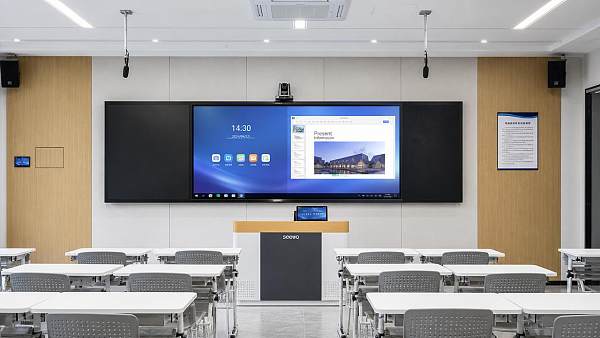
Smart classroom solutions promise connected learning, streamlined management, and better outcomes, yet many projects fall short when teacher-side usability is overlooked. For project managers and engineering leads, understanding how classroom technology performs in real teaching environments is essential to avoiding low adoption, wasted budgets, and weak ROI. This article explores why usability must be a core decision factor from planning to deployment.
Why scenario differences matter more than feature lists
In procurement meetings, Smart classroom solutions are often compared through specifications: display size, software modules, device compatibility, cloud dashboards, or AI functions. Yet classrooms do not fail because a system lacks a long feature list. They fail because the daily user—usually the teacher—cannot complete routine tasks quickly under real time pressure. A teacher who needs three extra steps to switch sources, launch a quiz, share a screen, or recover from a frozen interface will not use the system consistently, no matter how advanced the platform appears in demos.
For project managers and engineering project leaders, the key issue is that usability changes by scenario. A university lecture hall, a K-12 classroom, a vocational lab, and a corporate training room may all be labeled as smart learning spaces, but their operating patterns differ sharply. User turnover, lesson pacing, AV complexity, support availability, network stability, and content types all shape what “usable” really means. That is why Smart classroom solutions should be assessed as scenario-based operating systems, not just integrated technology packages.
The most common deployment scenarios and what teachers need in each
A practical evaluation starts with identifying the classroom environment and the teaching workflow. The table below highlights how teacher-side usability expectations shift across common deployment scenarios.
Scenario 1: K-12 classrooms need speed, familiarity, and almost zero friction
In K-12 environments, teachers manage limited time, varying student attention, and frequent transitions between explanation, questioning, media display, and writing. Smart classroom solutions in this scenario succeed when they shorten micro-actions. Teachers should be able to wake the system, open prepared content, annotate, save, and switch to another source without pausing instruction.
The most important design principle here is familiarity. If an interactive display, lesson management tool, or classroom control panel introduces unusual gestures, confusing icon design, or hidden menus, adoption declines rapidly. Teachers in this scenario are not rejecting technology; they are protecting teaching flow. Project teams should therefore prioritize interface consistency, preset templates, and physical fallback controls over advanced but rarely used functions.
A warning sign during pilot testing is when teachers ask support staff to perform routine operations for them. That usually means the Smart classroom solutions package is technically installed but operationally unfit.
Scenario 2: University lecture halls require reliability under turnover and scale
In higher education, the challenge is less about one teacher mastering one room and more about many lecturers using shared spaces with little setup time. Here, Smart classroom solutions must reduce dependency on room-specific knowledge. A lecturer entering five minutes before class should understand the control logic immediately: display source, audio level, lecture capture, document camera, and remote participation tools should all be visible and predictable.
Engineering leads should pay close attention to login friction, device recognition, and reset behavior after each session. Systems that remember previous settings incorrectly, keep the wrong input active, or require several authentication steps cause delays that scale across dozens of rooms and hundreds of weekly sessions. In this scenario, centralized management matters, but only after room-level usability is stable. A beautifully designed admin dashboard cannot compensate for lecturers who struggle at the podium.
Scenario 3: Hybrid classrooms magnify every usability weakness
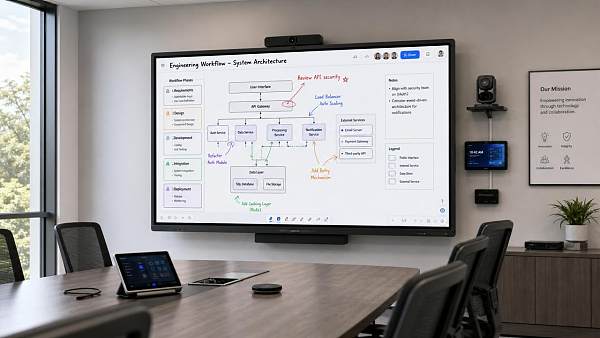
Hybrid learning spaces are where many Smart classroom solutions look impressive in proposals but underdeliver in daily use. The reason is simple: the teacher is no longer managing one audience and one content channel. They are managing in-room learners, remote participants, microphones, cameras, shared screens, chat, recording, and sometimes simultaneous collaboration tools. If the system does not unify control, the teaching burden rises sharply.
For this scenario, project managers should define usability around cognitive load. Can the teacher tell at a glance whether remote students can hear clearly? Can they switch camera modes without stopping the lesson? Can they share content to both local and remote audiences in one action? Can they recover quickly if the meeting software disconnects? Smart classroom solutions for hybrid teaching should minimize context switching between hardware controls, conferencing apps, and content platforms.
A common mistake is assigning too much operational responsibility to the teacher because the room contains “smart” automation. Automation only helps when the trigger logic matches actual lesson patterns.
Scenario 4: Vocational and technical training spaces depend on workflow alignment
In labs, workshops, simulation rooms, and technical training centers, Smart classroom solutions must fit task-based instruction. Teachers may need to display close-up demonstrations, monitor student stations, push instructions to multiple screens, or connect with specialized devices. In these environments, usability is not just about convenience; it can affect safety, equipment uptime, and learning continuity.
The best fit comes from workflow mapping before procurement. Which steps happen first? What needs to be visible to students? When does the teacher move physically around the room? What gloves, tools, or safety procedures affect touch interaction? Smart classroom solutions that assume a standard front-of-room teaching model often fail in technical settings because the real teaching path is mobile and equipment-centered.
How to compare needs across projects without oversimplifying
Different buyers often ask for a “standard smart classroom package” to simplify rollout. Standardization has value, but only if it allows controlled variation for real operating conditions. The table below can help project teams compare decision criteria more accurately.
What project managers should validate before choosing Smart classroom solutions
For project delivery teams, teacher-side usability should be converted into measurable checkpoints. First, test task completion time, not just function availability. If a teacher needs more than a few seconds for common actions, friction is already too high. Second, observe error recovery. A usable room is one where a non-technical user can correct basic issues without calling support. Third, review interface consistency across room types. Even when hardware differs, the control logic should feel familiar.
It is also wise to include representative users early: experienced teachers, less technical staff, substitute instructors, and hybrid teaching users. Smart classroom solutions should be judged by the broadest realistic user group, not by the most confident early adopter. Procurement decisions based only on demo-room performance usually miss this point.
Common misjudgments that lead to underused classrooms
One common misjudgment is assuming training will solve poor design. Training helps, but it cannot fully overcome interfaces that interrupt teaching flow. Another is prioritizing management analytics while neglecting room operation. Reporting and centralized visibility are valuable, yet if teachers avoid using key functions, the data layer becomes misleading.
A third mistake is treating all rooms as equal. Smart classroom solutions should not be copied identically across every site if the teaching model, room size, or support structure differs. Finally, many teams underestimate the long-term cost of low adoption. The financial loss is not limited to hardware underuse; it includes support tickets, retraining, scheduling inefficiency, and weakened confidence in future digital projects.
Scenario-based deployment advice for better ROI
The strongest rollout strategy is phased and evidence-driven. Start by grouping rooms into operational categories rather than treating the campus or organization as one uniform environment. Define the top five teacher tasks in each category. Build pilot rooms around those tasks. Then measure adoption, support demand, and lesson continuity over several weeks, not just launch-day satisfaction.
For organizations seeking stronger visibility and trust in the global education technology and infrastructure market, scenario-based content also matters externally. Platforms such as GTIIN and TradeVantage help businesses and solution providers communicate practical value with higher authority, stronger search visibility, and better B2B discovery across global supply chain and industrial audiences. For vendors and integrators, demonstrating how Smart classroom solutions fit real teaching scenarios can improve both project credibility and digital reach.
FAQ: scenario-focused questions buyers often ask
Are Smart classroom solutions worth it for standard teaching rooms?
Yes, if the solution reduces daily friction and supports core teaching actions better than current tools. In standard rooms, simplicity often creates more value than complex feature expansion.
Which scenario carries the highest usability risk?
Hybrid classrooms usually carry the highest risk because the teacher manages more channels, more tools, and more failure points at once. Unified control is essential.
How can engineering teams test teacher-side usability objectively?
Use scenario tasks such as start class, switch input, annotate, launch remote session, and recover from a common issue. Measure time, mistakes, and support dependence across different user profiles.
Final takeaway for project planning
Smart classroom solutions deliver value when they fit the teaching scenario, reduce operational friction, and let teachers stay focused on instruction rather than system management. For project managers and engineering leads, the right question is not “Which platform has the most features?” but “Which system works naturally in this room, for this user group, under this teaching pattern?” If you begin with that scenario-based lens, usability becomes a design requirement instead of an afterthought—and adoption, ROI, and long-term project success improve accordingly.
Recommended News
 Portable oxygen concentrators vary more in noise than spec sheets suggestPortable oxygen concentrators may share similar specs, yet real-world noise can vary widely. Learn what decibel ratings miss and choose a quieter, more comfortable model with confidence.
 Interactive whiteboards are easier to buy than to integrate wellInteractive whiteboards are easy to buy, but hard to integrate. Discover how to align workflows, IT, training, and ROI for smarter deployment.
![]() Medical diagnostic equipment upgrades should start with workflow bottlenecksMedical diagnostic equipment upgrades should start with workflow bottlenecks. Discover how targeted investments improve throughput, integration, ROI, and diagnostic efficiency.
Medical diagnostic equipment upgrades should start with workflow bottlenecksMedical diagnostic equipment upgrades should start with workflow bottlenecks. Discover how targeted investments improve throughput, integration, ROI, and diagnostic efficiency.![]() Eco-friendly building materials can raise budgets before they lower themEco-friendly building materials may raise upfront budgets, but they can cut long-term costs, improve compliance, and strengthen asset value. Learn when the premium truly pays off.
Eco-friendly building materials can raise budgets before they lower themEco-friendly building materials may raise upfront budgets, but they can cut long-term costs, improve compliance, and strengthen asset value. Learn when the premium truly pays off. Ergonomic workspace design fixes discomfort, but not every layout problemErgonomic workspace design improves comfort, focus, and buying decisions—but not every layout issue. Learn what upgrades work, what room limits remain, and how to choose smarter.
![]() Outdoor garden supplies demand shifts earlier than many sellers plan forOutdoor garden supplies demand is starting earlier than many sellers expect. Learn what drives the shift and how distributors, wholesalers, and agents can plan smarter to win more sales.
Outdoor garden supplies demand shifts earlier than many sellers plan forOutdoor garden supplies demand is starting earlier than many sellers expect. Learn what drives the shift and how distributors, wholesalers, and agents can plan smarter to win more sales. Sustainable home decor sells better when materials are easy to verifySustainable home decor sells better when material claims are easy to verify. Discover how traceable data, certifications, and clear sourcing build trust and boost B2B sales.
 Modern office furniture trends are changing around hybrid work needsModern office furniture trends are redefining hybrid workplaces with flexible layouts, ergonomic design, and smart tech integration. Discover what drives demand and smarter buying decisions.
 Smart street lighting projects often miss the maintenance sideSmart street lighting projects often overlook maintenance. Learn how diagnostics, spare parts, and scenario-based support improve reliability, reduce downtime, and protect long-term value.
 Solid-state battery breakthroughs are real, but mass rollout is still difficultSolid-state battery breakthroughs are real, but scaling remains difficult. Explore what’s driving progress, what blocks mass rollout, and where commercialization may happen first.
![]() Commercial LED lighting retrofits save money, but not at the same paceCommercial LED lighting can cut costs, but payback varies by warehouse, office, retail, and industrial scenario. Discover how to identify the fastest-return retrofit opportunities.
Commercial LED lighting retrofits save money, but not at the same paceCommercial LED lighting can cut costs, but payback varies by warehouse, office, retail, and industrial scenario. Discover how to identify the fastest-return retrofit opportunities. Lithium battery storage projects fail early when thermal planning is weakLithium battery storage projects fail early when thermal planning is weak. Learn the key checks to improve safety, uptime, compliance, and long-term project returns.
 Photovoltaic solar panels: when higher efficiency is not the better dealPhotovoltaic solar panels are not always best when efficiency is highest. Discover how lifecycle cost, payback, and site conditions can deliver smarter ROI and better sourcing decisions.
 Plant-based protein processing depends more on texture than many expectPlant-based protein processing relies heavily on texture to improve quality, control risk, and boost consistency. Learn how better texture management strengthens compliance and competitiveness.
 Foldable screen technology keeps improving, yet repair costs remain a problemFoldable screen technology is getting stronger and smarter, but repair costs still worry buyers. Discover who should buy, key ownership risks, and how to choose wisely.
 Next-gen wireless charging sounds convenient, but how efficient is it?Next-gen wireless charging sounds effortless, but how efficient is it in real use? Explore heat, power loss, alignment, and the market factors shaping adoption.
![]() Wearable technology is improving fast, but comfort still decides adoptionWearable technology is evolving fast, but comfort still drives real adoption. Explore how design, fit, battery life, and daily usability shape the wearables consumers truly keep using.
Wearable technology is improving fast, but comfort still decides adoptionWearable technology is evolving fast, but comfort still drives real adoption. Explore how design, fit, battery life, and daily usability shape the wearables consumers truly keep using. Smart home devices wholesale margins shrink faster than many expectSmart home devices wholesale margins are shrinking fast. Learn what causes profit erosion, which categories face price wars, and how distributors can protect growth and improve sourcing decisions.
 Agri-PV systems make sense only when land use goals are clearAgri-PV systems create business value only when land use goals are clearly defined. Discover how aligned energy, farming, and ESG priorities reduce risk and improve returns.
 Organic fertilizers vs synthetic inputs: where does the payoff change?Organic fertilizers vs synthetic inputs: discover where costs, compliance, soil health, and market premiums shift the payoff—and how to choose the smartest long-term strategy.
 Smart classroom solutions often underdeliver without teacher-side usabilitySmart classroom solutions often fail when teacher-side usability is ignored. Discover scenario-based insights to improve adoption, reduce friction, and maximize classroom ROI.












Popular Tags
Global Trade Insights & Industry
Our mission is to empower global exporters and importers with data-driven insights that foster strategic growth.
Search News
Popular Tags
Industry Overview
The global commercial kitchen equipment market is projected to reach $112 billion by 2027. Driven by urbanization, the rise of e-commerce food delivery, and strict hygiene regulations.