

Interactive whiteboards are improving, but software still decides value
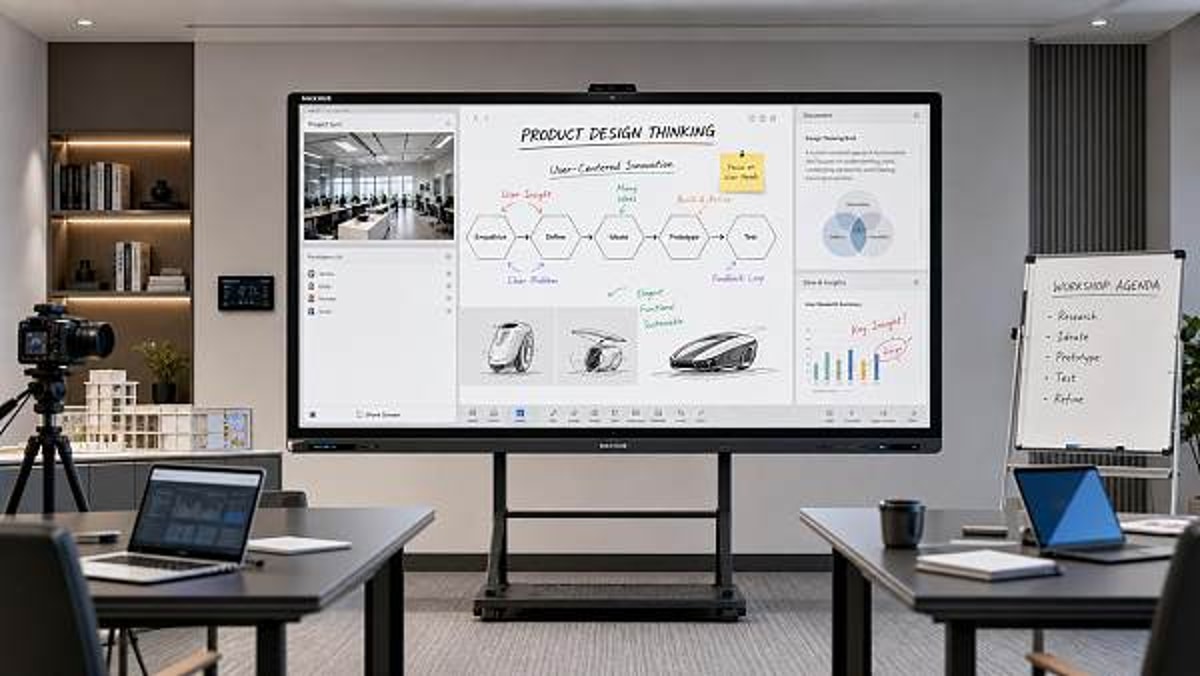
Interactive whiteboards continue to evolve with sharper displays, faster touch response, and better device compatibility, but for technical evaluators, hardware alone no longer defines long-term value. The real differentiator is software—its usability, integration, security, and update ecosystem. Understanding this shift is essential for making smarter procurement decisions and identifying solutions that deliver measurable performance across classrooms, meeting rooms, and collaborative work environments.
Why scenario differences matter more than raw specifications
For many buyers, Interactive whiteboards still enter the evaluation process as display devices: screen size, brightness, touch points, operating system, ports, and mounting options. Those factors remain relevant, but they rarely explain whether a deployment will succeed after six months of daily use. Technical evaluators are increasingly asked to assess a broader question: in which environment will the board create sustained productivity, and what software layer is required to support that outcome?
This is where application context changes the decision. A school district may care about annotation tools, lesson content sharing, student device casting, and classroom management. A corporate meeting room may prioritize unified communications, wireless conferencing, calendar integration, remote collaboration, and security controls. A design review team may need low-latency inking, file interoperability, and version traceability. In each case, the same Interactive whiteboards hardware can deliver very different value depending on software maturity.
For organizations sourcing at scale, this software-first lens also supports stronger lifecycle economics. A board that looks cost-effective at purchase may create hidden support costs if its firmware updates are inconsistent, its app ecosystem is closed, or its management console is weak. In contrast, a slightly higher-priced model with reliable software support can reduce retraining, downtime, and replacement risk. That makes scenario-based evaluation a practical requirement, not just a strategic preference.
Where Interactive whiteboards are used most often today
Interactive whiteboards now serve multiple environments beyond the traditional classroom. Technical evaluators should begin by mapping the expected use cases instead of assuming that one specification sheet fits all. The most common application scenarios include education, enterprise collaboration, training centers, hybrid project spaces, customer-facing presentation rooms, and operational command environments.
Scenario 1: Education settings need low-friction software, not just large screens
In education, Interactive whiteboards are successful when they reduce classroom friction. That means teachers must be able to launch lessons quickly, switch between content sources, annotate naturally, save notes, and share materials without requiring repeated IT intervention. A technically advanced display becomes a burden if educators need multiple steps just to begin instruction.
The most valuable software features in this scenario are often simple and operational: intuitive whiteboarding tools, split-screen capability, cloud storage support, student screen sharing, OCR for handwritten notes, and compatibility with common learning platforms. Update stability is especially important because classroom downtime immediately affects teaching continuity. Technical evaluators should ask whether updates can be centrally managed, scheduled outside instruction hours, and rolled back if problems occur.
Accessibility also matters. Multi-language interface support, readable iconography, stylus responsiveness, and support for assistive workflows can determine whether a device is broadly adopted or unevenly used. In this scenario, software usability often has a bigger impact than premium hardware specifications that teachers may rarely notice in daily practice.
Scenario 2: Meeting rooms depend on ecosystem compatibility
In corporate collaboration spaces, Interactive whiteboards are expected to work as part of a larger digital ecosystem. Users want to walk into a room, start a meeting, join a call, share a laptop screen, annotate content, and continue collaboration with remote participants. If the board cannot integrate smoothly with major conferencing tools, its hardware quality becomes secondary.
Technical evaluators in this environment should prioritize platform interoperability. Check whether the software supports Microsoft Teams, Zoom, Google Workspace, Webex, or other enterprise-standard environments without awkward workarounds. Also verify single sign-on compatibility, device fleet management, secure guest sharing, and user permission settings. For global organizations, localization and cross-region deployment consistency are also critical.
Another software-driven issue is meeting continuity across devices. Can a session begin on a room display and continue from a laptop or tablet? Can notes be exported directly into project systems? Can remote users interact with the same canvas in real time? These questions reveal the practical value of Interactive whiteboards in modern hybrid work, where software bridges physical and remote collaboration.
Scenario 3: Training spaces require content control and repeatability
Training centers, partner academies, and internal onboarding facilities often use Interactive whiteboards differently from schools or boardrooms. Here, the emphasis is on repeatable delivery across cohorts, trainers, and locations. Software must support content templates, recording, interactive exercises, user role controls, and easy recovery between sessions.
A common mistake is to select products based on presentation polish while ignoring administrative workflow. If trainers cannot quickly access approved materials, switch between modules, and save session outputs, delivery quality becomes inconsistent. For multi-site organizations, the software should allow central content distribution and standardized configuration. This is especially relevant for global exporters, channel networks, and industrial firms that need consistent product education across regions.
Because training often involves temporary users, security architecture must also be reviewed carefully. Guest access, file cleanup after sessions, account separation, and audit visibility all affect risk exposure. In such environments, well-managed software can protect both productivity and compliance.
Scenario 4: Engineering, planning, and technical review rooms need precision and openness
When Interactive whiteboards are used for technical review, the software bar rises again. Teams may be marking up CAD exports, process diagrams, schematics, data dashboards, or logistics workflows. The requirement is not merely collaboration, but accurate collaboration. Low-latency writing, palm rejection, fine object manipulation, and support for high-resolution assets become meaningful only if the software preserves fidelity.
Open file support is especially important in this scenario. If a board system locks teams into proprietary formats or weak export options, it disrupts engineering handoff and creates hidden rework. Evaluators should examine whether notes, markups, screenshots, and board sessions can be saved into standard file types and integrated with cloud repositories or document control systems. For technical teams, interoperability is a value multiplier.
This scenario also highlights the importance of update discipline. Even a minor software change can affect inking behavior, object scaling, or third-party app performance. Vendors that provide transparent release notes, version support policies, and enterprise deployment guidance are more suitable for technical review environments than vendors focused only on display innovation.
How to compare requirements across scenarios
A structured comparison helps technical evaluators avoid overbuying in one area while missing core needs in another. Interactive whiteboards should be assessed through the combined lens of user behavior, software ecosystem, IT governance, and support maturity.
Common misjudgments when evaluating Interactive whiteboards
One frequent misjudgment is equating touch performance with collaboration quality. Fast touch response is valuable, but if users cannot easily store, resume, search, or distribute board content, the workflow remains incomplete. Another mistake is treating bundled apps as proof of software strength. What matters is not app quantity, but whether the software solves the target scenario with consistency and supportability.
A second error is underestimating IT administration. Interactive whiteboards deployed in single rooms may seem easy to manage, but large organizations quickly encounter issues around updates, account provisioning, network policy, and remote diagnostics. Without centralized management tools, support overhead can rise sharply.
A third oversight involves vendor commitment. Technical evaluators should investigate release cadence, support channels, API openness, training resources, and regional service coverage. In global supply chain and trade-driven organizations, where meeting spaces and training rooms may be distributed across markets, uneven software support can weaken return on investment more than any hardware limitation.
A practical framework for technical evaluators
To assess Interactive whiteboards effectively, evaluators can use a four-step framework. First, define the dominant usage scenario by observing actual workflows, not just stakeholder assumptions. Second, identify the software dependencies that make that scenario work, such as conferencing integration, cloud storage, annotation logic, or identity management. Third, test with realistic users in realistic conditions. Fourth, calculate total operational impact, including training, support, update management, and ecosystem compatibility.
This framework is especially relevant for organizations that use industry intelligence and digital visibility to support growth. Whether a company is hosting internal training, coordinating international teams, or presenting solutions to buyers, the effectiveness of collaboration technology depends on workflow alignment. A display is visible on day one; software value becomes visible over time.
FAQ: scenario-based questions buyers often ask
Are Interactive whiteboards still worth investing in if many users work remotely?
Yes, but only if the software supports hybrid participation well. For remote-heavy teams, the board must function as a shared collaboration endpoint rather than a room-only display. Real-time cloud sync, remote annotation, and conferencing integration are essential.
Which scenario is most sensitive to software quality?
Corporate collaboration and technical review environments are usually the most sensitive because they depend heavily on interoperability, access control, and content continuity. In education, usability often matters more than advanced integration, but software quality still strongly shapes adoption.
What should be tested before large-scale procurement?
Test login flow, wireless sharing, annotation save/export, third-party app support, remote management, firmware update behavior, and security settings. A pilot should include both end users and IT administrators to reflect real deployment conditions.
Final take: match the software to the scenario before comparing the screen
Interactive whiteboards are clearly improving in hardware performance, but technical evaluators should resist making procurement decisions based on panel quality alone. The real long-term differentiator is still software, and software value only becomes meaningful when measured against a specific application scenario. Classrooms need low-friction teaching tools, meeting rooms need platform compatibility, training spaces need repeatable content control, and technical review rooms need precision plus interoperability.
Before shortlisting vendors, define the dominant use environment, rank the required software capabilities, and validate them through live trials. That scenario-first approach helps organizations select Interactive whiteboards that deliver measurable adoption, lower support burden, and stronger long-term value across evolving collaborative workplaces.
Recommended News
 Portable oxygen concentrators are quieter now, but not always lighterPortable oxygen concentrators are getting quieter, but not always lighter. Explore the trade-offs in weight, battery life, comfort, and daily usability before you compare today’s top options.
 Interactive whiteboards are improving, but software still decides valueInteractive whiteboards deliver real value when software matches the scenario. Explore how usability, integration, security, and updates shape smarter buying decisions.
 Medical diagnostic equipment downtime often starts with calibration neglectMedical diagnostic equipment downtime often starts with missed calibration. Learn the warning signs, checklist priorities, and practical steps to prevent failures and keep healthcare operations reliable.
 Eco-friendly building materials are easier to specify than to sourceEco-friendly building materials are easier to specify than source. Learn how procurement teams can verify claims, reduce risk, and find reliable suppliers faster.
 Ergonomic workspace design can fail if chair fit comes lastErgonomic workspace design starts with chair fit. Learn how the right seat improves posture, comfort, and focus—and why fixing it first can transform your workspace.
 Outdoor garden supplies demand shifts faster than many expectOutdoor garden supplies demand is shifting faster than expected. Discover key B2B trends, smarter sourcing insights, and practical strategies to stay competitive and capture growth.
 Sustainable home decor sells better when materials are clearly disclosedSustainable home decor sells better when brands clearly disclose materials, finishes, and sourcing. Discover why transparency builds trust, justifies price, and drives more confident buying.
 Modern office furniture trends now favor modular over fixed layoutsModern office furniture is shifting to modular layouts for flexibility, lower lifecycle costs, and better hybrid work performance. See why enterprises are moving away from fixed office design.
 Smart street lighting projects stall when controls are overcomplicatedSmart street lighting projects often stall when controls become too complex. Learn how to simplify deployment, reduce risk, and scale citywide with practical, maintainable systems.
 Solid-state battery breakthroughs look promising, but scale is harderSolid-state battery breakthroughs promise safer, higher-density energy storage, but scaling remains the real challenge. Explore what this means for supply chains, investment, and market advantage.
 Commercial LED lighting upgrades often save less than expectedCommercial LED lighting upgrades can underdeliver when baseline data, controls, and installation costs are misjudged. Learn how to assess real savings, reduce ROI risk, and make smarter investment decisions.
 Lithium battery storage payback can change with one policy updateLithium battery storage payback can shift fast after one policy update. See how tariffs, tax credits, grid pricing, and incentives change ROI—and how finance teams can approve smarter.
 Photovoltaic solar panels now compete on output in low lightPhotovoltaic solar panels now compete on low-light output. Discover how buyers can compare yield, risk, and supplier value to source smarter and boost project returns.
 Plant-based protein processing changes texture more than many expectPlant-based protein processing reshapes texture, stability, and safety more than expected. Explore key risks, QC checkpoints, and smarter sourcing insights for consistent results.
 Foldable screen technology is improving, but crease concerns remainFoldable screen technology is evolving fast with slimmer designs and stronger hinges, but crease concerns still shape buying decisions. Explore where it matters most.
 Next-gen wireless charging still faces a heat management problemNext-gen wireless charging promises faster, more flexible power delivery, but heat remains the key barrier. Discover how thermal limits impact safety, efficiency, and market readiness.
 Wearable technology adoption drops when comfort gets overlookedWearable technology adoption falls fast when comfort is ignored. Discover how fit, materials, weight, and battery life shape long-term use and smarter buying decisions.
 Smart home devices wholesale is no longer just about low pricingSmart home devices wholesale now goes beyond low pricing. Discover how reliability, compatibility, and supply chain confidence help distributors choose profitable, trusted partners.
 Agri-PV systems make sense only when land use is planned wellAgri-PV systems deliver real value only when land use is planned well. Discover how smart site, crop, grid, and compliance decisions turn dual-use solar into a bankable, sustainable project.
 Organic fertilizers may improve soil slower, but results last longerOrganic fertilizers improve soil slowly but deliver longer-lasting results. Learn how they boost soil health, support safer growing, and help you choose the right option for sustainable planting success.
 Smart classroom solutions fail when teachers need too many appsSmart classroom solutions fail when teachers juggle too many apps. Discover why integrated, easy-to-use platforms drive adoption, ROI, and scalable learning success.
















Popular Tags
Global Trade Insights & Industry
Our mission is to empower global exporters and importers with data-driven insights that foster strategic growth.
Search News
Popular Tags
Industry Overview
The global commercial kitchen equipment market is projected to reach $112 billion by 2027. Driven by urbanization, the rise of e-commerce food delivery, and strict hygiene regulations.