

Ergonomic workspace design can fail if chair fit comes last
Ergonomic workspace design often focuses on desks, screens, and lighting, yet the entire setup can fall short when chair fit is treated as an afterthought. For everyday users, the wrong chair can quietly undermine comfort, posture, and productivity over time. Understanding how proper seating supports the body is the first step toward creating a workspace that truly works for long hours and better well-being.
Why does ergonomic workspace design fail when the chair is chosen last?
Many people start ergonomic workspace design with the visible elements: a larger desk, a monitor arm, a keyboard tray, or better lighting. Those upgrades matter, but the chair is the part that stays in direct contact with the body for the longest time. If chair fit is poor, every other adjustment has to compensate for a weak foundation. A desk can be the right height on paper, yet still feel wrong if the seat is too high, too deep, or too soft for the user.
The chair determines hip position, knee angle, pelvis stability, and spinal support. Once those points are off, users often lean forward, round the shoulders, crane the neck, or dangle the feet. Over time, this can turn a carefully planned workspace into a source of fatigue. In practical terms, ergonomic workspace design fails not because the concept is flawed, but because seating controls the body’s alignment from the ground up.
For end consumers, this issue is easy to miss because discomfort often develops gradually. A chair that feels acceptable for 20 minutes may become a problem after two or three hours. That is why successful ergonomic workspace design starts with how the body sits, not only with how the room looks.
What are the early signs that your chair is undermining your workspace?
A poor chair fit does not always cause immediate pain. More often, it produces small warning signs that people normalize. You may shift constantly, sit on the edge of the seat, cross one leg to feel stable, or lower your head toward the screen. These habits are often adaptation strategies, not harmless preferences.
Common signs include neck tightness by afternoon, pressure behind the knees, lower back fatigue, sore shoulders, numb legs, and reduced focus late in the day. Some users also notice that they feel more comfortable working from a dining chair for short sessions than from their “office chair,” which may signal that the current chair’s dimensions or support pattern do not match their body.
Another overlooked sign is mismatch between the chair and desk height. If raising the chair helps arm position but leaves the feet unsupported, or lowering the chair helps the legs but makes typing awkward, the setup is not truly working. In strong ergonomic workspace design, the chair should make it easier to maintain neutral posture rather than force constant compromise.
What chair features matter most in ergonomic workspace design?
Consumers often compare chairs by appearance, padding, or brand reputation, but fit-related features matter more than style. The best chair is not the most expensive one; it is the one that supports the user’s body dimensions and work habits. In ergonomic workspace design, several features have an outsized impact.
- Seat height adjustment: Feet should rest flat on the floor or on a footrest, with knees roughly level with or slightly below the hips.
- Seat depth: There should be a small gap between the front edge of the seat and the back of the knees. A seat that is too deep encourages slouching.
- Lumbar support: The lower back should feel supported without excessive pressure. Adjustable lumbar support is especially useful for shared or changing setups.
- Backrest recline: A slight recline can reduce spinal loading and help users avoid rigid, tiring upright posture.
- Armrests: They should support the forearms lightly without pushing the shoulders upward or blocking the chair from getting close to the desk.
- Seat firmness and stability: Overly soft cushions can make the pelvis sink and rotate backward, reducing postural support.
These features matter because ergonomic workspace design is not only about reducing pain. It is also about enabling sustainable concentration, smoother movement, and less energy wasted on self-correction. A well-fitted chair supports natural posture changes throughout the day instead of locking the body into one position.
How can everyday users tell whether a chair actually fits their body?
Fit should be judged while doing real tasks, not just during a quick showroom sit test. When testing a chair, users should sit back fully, place the feet flat, and position the arms as if typing. The key question is whether the body feels supported without strain or compensation. If the chair only feels comfortable in one rigid position, it may not be a good match for long work sessions.
A simple check is to evaluate five contact points: feet, thighs, pelvis, lower back, and forearms. If one of these areas lacks support, the rest of the setup may start to fail. For example, unsupported feet can pull on the lower back. Poor lumbar contact can lead to head-forward posture. Armrests that are too high can cause shoulder tension.
Body size also matters more than many buyers expect. Petite users often struggle with seats that are too deep and armrests that are too wide. Taller users may lack upper back support or proper seat height range. This is why ergonomic workspace design should be personalized. A chair described as “ergonomic” in marketing language is not automatically ergonomic for every person.
Quick chair fit checklist
Is an expensive chair always better for ergonomic workspace design?
Not necessarily. Price can reflect materials, mechanisms, durability, warranty, and brand positioning, but it does not guarantee fit. A premium chair that is wrong for your proportions may perform worse than a mid-range chair with the right adjustability. For end consumers, the smarter question is not “What is the best chair?” but “Which chair supports my body and tasks best?”
That said, very cheap chairs often cut corners in adjustment range, lumbar design, foam resilience, and long-term stability. The result is a chair that feels acceptable at first but degrades quickly or lacks enough customization to support healthy posture. In ergonomic workspace design, the ideal buying decision balances fit, adjustability, build quality, and frequency of use.
If you work or study for many hours each day, investing in a better chair can make sense because the chair influences daily comfort and long-term use. However, even a strong chair may need help from complementary adjustments such as a footrest, monitor height correction, or a desk with better clearance. Chair quality matters, but whole-system compatibility matters more.
What common mistakes do people make when setting up an ergonomic workspace?
One common mistake is choosing furniture based on room aesthetics before body needs. A sleek desk and modern chair can still create poor ergonomic workspace design if they do not fit the user. Another mistake is copying someone else’s setup from social media without considering height, task type, or sitting habits. What works for one person may create strain for another.
Many users also confuse posture with stillness. Good ergonomics is not about sitting perfectly upright all day. It is about reducing harmful strain while allowing movement. A chair that supports only one static pose may still lead to fatigue. Likewise, relying on cushions or rolled towels without fixing core fit problems often produces partial, temporary relief rather than true support.
Another frequent issue is adjusting the monitor and keyboard before establishing seat position. In effective ergonomic workspace design, the chair usually comes first because it sets the relationship between the body and the rest of the workstation. Once seat height, depth, and back support are correct, it becomes easier to place screens and input devices in workable positions.
Mistake-to-solution guide
How should you improve ergonomic workspace design if you cannot replace the chair right away?
A full chair replacement is not always possible immediately, but meaningful improvements can still be made. Start by adjusting seat height so the feet are supported. If that creates a desk mismatch, add a footrest or a stable support under the feet. If the seat is too deep, a back cushion can help reduce the depth and improve lumbar contact. If armrests interfere with desk access, lower them or remove them if the design allows.
You can also improve ergonomic workspace design by correcting related workstation elements. Raise the monitor so the head stays more neutral. Bring the keyboard and mouse closer so the elbows remain near the body. Create regular opportunities to stand, stretch, and reset posture. These steps do not replace proper chair fit, but they can reduce the strain caused by an imperfect seat.
Consumers should also pay attention to task duration. A chair that is tolerable for casual browsing may not be suitable for remote work, gaming, studying, or content creation. The longer the session, the more chair fit matters. Temporary fixes are useful, but if discomfort persists, the chair should move higher on the upgrade list.
What should you confirm before buying a new chair for ergonomic workspace design?
Before buying, confirm your body measurements, desk height, main tasks, and how many hours you typically sit each day. Check the chair’s adjustment ranges rather than relying only on product photos. Seat height range, seat depth, lumbar position, backrest recline, and armrest flexibility should all be reviewed carefully. If possible, look for clear dimensions and return policies rather than vague comfort claims.
It is also helpful to ask whether the chair supports dynamic sitting. In real ergonomic workspace design, users shift between focused typing, reading, calls, and short pauses. A chair should handle these transitions smoothly. Breathable materials, durable casters, and stable mechanisms can also affect daily use, especially in warmer environments or shared homes.
For people comparing options online, practical decision questions include: Does this chair fit my height range? Will it slide under my desk? Can I adjust lumbar support independently? Is the seat pan too deep for me? Are the armrests likely to block close desk work? These questions bring the buying process back to function, which is the core of effective ergonomic workspace design.
Final question: what is the smartest next step if you want a workspace that truly supports you?
The smartest next step is to evaluate your chair before changing everything else. If your current setup feels tiring, do not assume the monitor or desk is the only issue. Recheck how the chair fits your legs, pelvis, lower back, and arms during real work. In many cases, improving ergonomic workspace design starts by solving the seating mismatch that has been quietly affecting the whole system.
If you need to confirm a more specific solution, it helps to gather a few key details first: your height, current chair dimensions, desk height, daily sitting time, main work tasks, and the exact discomfort you feel. If you are comparing products, also review adjustment ranges, support features, delivery timelines, return terms, and budget limits. Those questions make it easier to choose a chair and workspace strategy that supports comfort, productivity, and long-term well-being instead of repeating the same setup mistakes.
Recommended News
 Portable oxygen concentrators are quieter now, but not always lighterPortable oxygen concentrators are getting quieter, but not always lighter. Explore the trade-offs in weight, battery life, comfort, and daily usability before you compare today’s top options.
 Interactive whiteboards are improving, but software still decides valueInteractive whiteboards deliver real value when software matches the scenario. Explore how usability, integration, security, and updates shape smarter buying decisions.
 Medical diagnostic equipment downtime often starts with calibration neglectMedical diagnostic equipment downtime often starts with missed calibration. Learn the warning signs, checklist priorities, and practical steps to prevent failures and keep healthcare operations reliable.
 Eco-friendly building materials are easier to specify than to sourceEco-friendly building materials are easier to specify than source. Learn how procurement teams can verify claims, reduce risk, and find reliable suppliers faster.
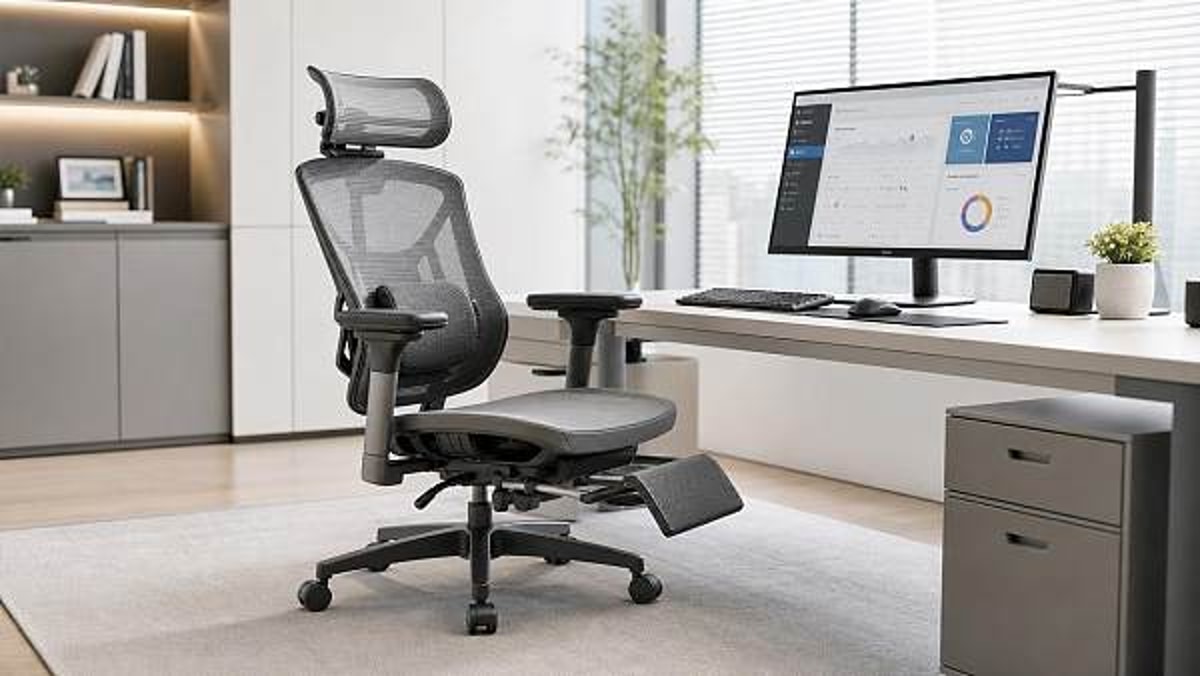
 Ergonomic workspace design can fail if chair fit comes lastErgonomic workspace design starts with chair fit. Learn how the right seat improves posture, comfort, and focus—and why fixing it first can transform your workspace.
 Outdoor garden supplies demand shifts faster than many expectOutdoor garden supplies demand is shifting faster than expected. Discover key B2B trends, smarter sourcing insights, and practical strategies to stay competitive and capture growth.
 Sustainable home decor sells better when materials are clearly disclosedSustainable home decor sells better when brands clearly disclose materials, finishes, and sourcing. Discover why transparency builds trust, justifies price, and drives more confident buying.
 Modern office furniture trends now favor modular over fixed layoutsModern office furniture is shifting to modular layouts for flexibility, lower lifecycle costs, and better hybrid work performance. See why enterprises are moving away from fixed office design.
 Smart street lighting projects stall when controls are overcomplicatedSmart street lighting projects often stall when controls become too complex. Learn how to simplify deployment, reduce risk, and scale citywide with practical, maintainable systems.
 Solid-state battery breakthroughs look promising, but scale is harderSolid-state battery breakthroughs promise safer, higher-density energy storage, but scaling remains the real challenge. Explore what this means for supply chains, investment, and market advantage.
 Commercial LED lighting upgrades often save less than expectedCommercial LED lighting upgrades can underdeliver when baseline data, controls, and installation costs are misjudged. Learn how to assess real savings, reduce ROI risk, and make smarter investment decisions.
 Lithium battery storage payback can change with one policy updateLithium battery storage payback can shift fast after one policy update. See how tariffs, tax credits, grid pricing, and incentives change ROI—and how finance teams can approve smarter.
 Photovoltaic solar panels now compete on output in low lightPhotovoltaic solar panels now compete on low-light output. Discover how buyers can compare yield, risk, and supplier value to source smarter and boost project returns.
 Plant-based protein processing changes texture more than many expectPlant-based protein processing reshapes texture, stability, and safety more than expected. Explore key risks, QC checkpoints, and smarter sourcing insights for consistent results.
 Foldable screen technology is improving, but crease concerns remainFoldable screen technology is evolving fast with slimmer designs and stronger hinges, but crease concerns still shape buying decisions. Explore where it matters most.
 Next-gen wireless charging still faces a heat management problemNext-gen wireless charging promises faster, more flexible power delivery, but heat remains the key barrier. Discover how thermal limits impact safety, efficiency, and market readiness.
 Wearable technology adoption drops when comfort gets overlookedWearable technology adoption falls fast when comfort is ignored. Discover how fit, materials, weight, and battery life shape long-term use and smarter buying decisions.
 Smart home devices wholesale is no longer just about low pricingSmart home devices wholesale now goes beyond low pricing. Discover how reliability, compatibility, and supply chain confidence help distributors choose profitable, trusted partners.
 Agri-PV systems make sense only when land use is planned wellAgri-PV systems deliver real value only when land use is planned well. Discover how smart site, crop, grid, and compliance decisions turn dual-use solar into a bankable, sustainable project.
 Organic fertilizers may improve soil slower, but results last longerOrganic fertilizers improve soil slowly but deliver longer-lasting results. Learn how they boost soil health, support safer growing, and help you choose the right option for sustainable planting success.
 Smart classroom solutions fail when teachers need too many appsSmart classroom solutions fail when teachers juggle too many apps. Discover why integrated, easy-to-use platforms drive adoption, ROI, and scalable learning success.














Popular Tags
Global Trade Insights & Industry
Our mission is to empower global exporters and importers with data-driven insights that foster strategic growth.
Search News
Popular Tags
Industry Overview
The global commercial kitchen equipment market is projected to reach $112 billion by 2027. Driven by urbanization, the rise of e-commerce food delivery, and strict hygiene regulations.