

How Do You Choose a Projector for a Conference Room?
Choose a conference room projector by working backward from the image people need to read: the presentation content, the farthest seat, the screen size, and the lighting that will remain on during meetings. Then check whether the projector can produce that image from an available mounting position and connect reliably to the devices employees use. Price comparisons become useful once those requirements are clear.
For a room used mainly for slides and video calls, readable text, straightforward connections, and predictable operation deserve priority. A room used to review detailed drawings or large spreadsheets may need higher resolution and a larger image. If strong daylight reaches the screen and cannot be controlled, a commercial display may be the more practical choice. Buying a brighter projector alone may not solve the visibility problem.
What should you measure before comparing projectors?
Start with a room survey. Record the distance from the proposed screen to the farthest viewer, the usable screen width and height, possible projector locations, and the direction of daylight. Also note ceiling lights that illuminate the screen, obstacles above the table, and the route for power and signal cables. These observations eliminate unsuitable models before procurement spends time comparing specifications.
The intended content matters as much as room dimensions. A sales presentation with large headings places different demands on the system than a finance meeting displaying a spreadsheet. Engineering drawings, dashboards, and software demonstrations can expose readability problems that a full-screen photograph will hide.
Image size should therefore follow the smallest information participants must read. Ask the team to provide representative files, including its densest routine slide or worksheet. View them at the proposed screen size from the farthest seat. If labels remain too small, increasing resolution alone will not make them physically larger; the solution may require a larger image, a different seating arrangement, or changes to the presentation layout.
Screen height also has practical limits. An image can be large enough on paper yet difficult to see because its lower edge sits behind participants’ heads. Check sightlines with the room occupied, especially where seating is arranged around a long table. The usable image area may be smaller than the available wall suggests.
How bright does a conference room projector need to be?
There is no dependable brightness recommendation based only on the number of seats. Required light output depends on image area, light falling on the screen, screen characteristics, and the content being shown. A larger image spreads the projector’s output over more surface area, reducing illumination unless output increases accordingly.
Assess brightness under the lighting people will actually use. A demonstration in a dark room can make a projector look convincing even when normal meeting conditions leave charts washed out. Participants may need lights for note-taking, while a camera may need adequate illumination for video calls. Establish those conditions before evaluating the projected image.
When comparing specifications, look for brightness measurements stated under a recognized measurement method, such as ANSI or ISO, and check that the figures are comparable. Treat an unexplained “lumens” claim cautiously. Also ask which picture mode delivers the quoted output. The brightest setting may change color balance or increase fan noise, making a lower-output mode preferable for everyday meetings.
Ambient light reduces visible contrast because it illuminates areas that should appear dark. More projector output can improve visibility, but it cannot prevent daylight from washing out the screen. Blinds, separate lighting zones, and a screen positioned away from windows can make a substantial difference. These room changes should be considered alongside the equipment budget.
An ambient-light-rejecting screen can help in suitable conditions, but compatibility matters. Its performance depends on the direction of unwanted light, the projector’s position, and the viewers’ seating angles. Screens designed for conventional projection and ultra-short-throw projection are not automatically interchangeable. Request a demonstration of the proposed projector and screen together before accepting a claim that the screen will resolve a bright-room problem.
Is Full HD enough, or should you choose 4K?
Full HD can be adequate for presentations with well-sized text, video, and routine meeting content. Higher resolution becomes more useful when the room regularly displays fine drawings, multiple application windows, or dense worksheets on a large screen. The benefit still depends on viewing distance and the quality of the material being displayed.
Check the projector’s native resolution and its method of producing the displayed image. “Supports 4K input” describes the ability to accept a signal; it does not by itself establish that the projector displays the full detail of that signal. Models may use native imaging devices or pixel-shifting techniques, so the procurement specification should state the required display capability clearly.
The entire signal path must support the intended resolution. A capable projector cannot recover detail lost because a conferencing appliance, adapter, wireless presentation system, or laptop output has reduced the signal. Test the complete connection chain rather than reviewing the projector in isolation.
Aspect ratio deserves attention too. Match the screen and projector to the content used most often, then check how other formats will appear. Black bars, cropping, or scaling can reduce usable image area. For spreadsheet-heavy meetings, retaining readable text across the full working image matters more than filling every part of the screen.
How do throw distance and installation affect your choice?
Throw ratio links projector position to image width. It is calculated as the lens-to-screen distance divided by the image width. For example, a throw ratio of 1.5 requires approximately 3 meters between the lens and screen to produce an image 2 meters wide. This is a geometric example, not a recommended installation distance; the chosen model’s lens specifications determine the actual range.
A projector with an optical zoom range offers some flexibility, but the available ceiling position must still fall within that range. Measure from the lens position, and use the manufacturer’s installation guidance to check image size, mounting offset, and lens shift. A model that fits the budget but cannot produce the required image from the available location is unsuitable.
Short-throw and ultra-short-throw projectors can help where mounting depth is limited or presenters would otherwise cross the beam. They also demand attention to placement and screen flatness. Small alignment errors can be conspicuous, particularly with ultra-short-throw equipment. Include the screen, bracket, and installation adjustment in the assessment.
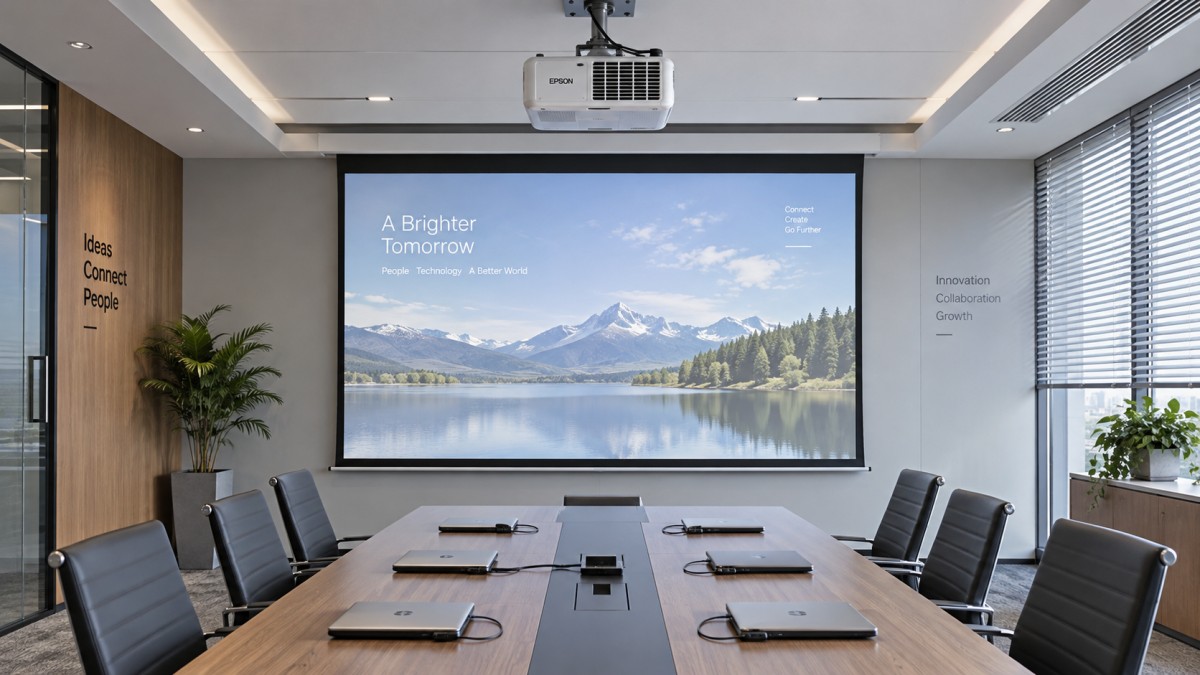
Prefer an installation that achieves a rectangular image through suitable positioning and optical adjustment. Digital keystone correction can compensate for an angled projector, but it resamples the image and may reduce text clarity or usable image area. Lens shift, where available, provides positioning flexibility without the same digital correction penalty.
Check ventilation clearances, service access, and fan noise at occupied seats. A projector directly above the table may be audible during quiet discussion, especially in its highest-output mode. Ceiling height, microphone placement, and the location of return-air vents can also affect the installation. Ask for the proposed layout to be reviewed as a complete room arrangement.
Which connections are necessary for dependable meetings?
Build the connection requirements around the workplace’s actual devices: managed laptops, visitor laptops, conferencing equipment, and any permanent room computer. HDMI is a useful baseline, but the presence of a port does not guarantee compatibility with every resolution, adapter, or cable route. Long signal runs may require an appropriate transmission system, whose capabilities must match the intended video format.
USB-C requires closer inspection. Depending on the device, a USB-C port may handle video, data, power, or only some of these functions. If the intended experience is a single cable that displays the laptop and supplies power, verify both video support and charging capability across the equipment involved. Include the adapter or dock that users will actually connect.
Wireless presentation can simplify sharing, but it adds dependencies involving software, network access, permissions, and device compatibility. Check how a visitor joins, whether installation or administrator rights are required, and how switching presenters works. Keep an accessible wired connection so a meeting can continue when wireless sharing fails or is restricted.
For hybrid meetings, define how presentation audio reaches the room speakers and how participants’ voices reach remote attendees. Built-in projector speakers may be sufficient for occasional playback in a small room, but their presence does not establish that the room has suitable conferencing audio. Test speech intelligibility and media playback as part of the complete system.
Does a laser projector justify the extra cost?
A laser light source can suit a frequently used room where maintenance access is difficult or interruptions carry a high cost. A lamp-based model may remain reasonable for a lightly used space if replacement lamps are available and servicing is straightforward. Compare the expected workload and maintenance arrangements before choosing either technology.
Published light-source life should not be treated as a guarantee that brightness remains unchanged for that entire period. Read the manufacturer’s definition, operating mode, and brightness-retention conditions. Also establish what happens if a laser module fails: service procedures and replacement economics can differ from those of a replaceable lamp.
Laser equipment can still require cleaning, filter maintenance, or other servicing, depending on its design and environment. Ask for the maintenance schedule and check whether staff can carry it out with the projector installed. Dust exposure and restricted airflow should be addressed through placement and upkeep.
Compare total ownership costs across the same planned service period. Include the projector, screen, mounting, installation, signal equipment, energy use, consumables, scheduled maintenance, and service arrangements. For a heavily booked room, the availability of a loan unit or a clear repair process may influence the decision more than a modest difference in purchase price.
What should procurement require before accepting the installation?
Request a proposal that describes the room outcome as well as the hardware. It should identify the intended image size, mounting position, lighting conditions, connection methods, and equipment included. Ask suppliers to explain any assumptions that could affect readability or installation, particularly where a screen change, lighting adjustment, or network configuration is necessary.
Acceptance should use real presentation material and normal operating conditions. A focused check can cover the problems most likely to disrupt meetings:
- Read the smallest routinely used text from the farthest seat with normal room lighting.
- Check focus and alignment across the image, including corners containing spreadsheet labels.
- Connect representative employee and visitor devices through the installed cables, adapters, and wireless system.
- Switch presenters and restart the system to confirm that routine operation is straightforward.
- Run a hybrid meeting to assess shared content, audio, and fan noise together.
Record the accepted settings and give room users a short operating guide. Assign responsibility for updates, cleaning, and fault reporting, with a clear service contact. The purchase decision should rest on a readable image and a repeatable meeting workflow demonstrated in the room. If either remains unreliable, resolve the installation or equipment mismatch before signing off.
 When is supply chain disruption management consulting worth the cost?When is supply chain disruption management consulting worth the cost? Learn how to compare fees, avoidable losses, and recovery options to make a confident investment decision.
 How to use macroeconomic analysis to forecast industrial demandApply an industrial macro analysis methodology to forecast demand, interpret economic signals, and plan inventory and capacity. Discover practical steps for smarter business decisions.
 How to assess Singapore suppliers with global supply chain intelligenceExplore international supply chain intelligence Singapore buyers can use to verify suppliers, assess capabilities and delivery risks, and make confident sourcing decisions.
 Which macroeconomic indicators help forecast U.S. industrial demand?Explore industrial macro analysis USA decision-makers can use to forecast demand. Track new orders, inventories, and credit signals to sharpen procurement and capacity decisions.
 Can a food processing manufacturer meet your small-batch needs?Can a food processing manufacturer meet your small-batch needs? Discover how to assess minimum orders, costs, packaging, and safety to choose the right partner for your launch.
 How to verify sourcing intelligence data before selecting suppliersVerify sourcing intelligence data before choosing suppliers. Learn how to check company records, certifications, and capacity to reduce procurement risk and build a reliable shortlist.
 How to use supplier risk analysis to spot financial warning signsUse supplier risk analysis to spot cash flow pressure, debt risks, and delivery warning signs. Learn practical steps to reduce exposure and protect supply continuity.
 When dual sourcing makes sense in a sourcing strategy for manufacturersSourcing strategy for manufacturers: learn when dual sourcing strengthens supply continuity, reduces disruption risk, and protects production without adding unnecessary complexity.
 How bulk commodities pricing affects long-term supply contractsBulk commodities pricing shapes long-term supply contracts through index rules, freight, quality, volume, and currency risk. Explore strategies for resilient costs and supply security.
 Which global manufacturing trends by sector matter most for sourcing plans?Global manufacturing trends by sector: identify sourcing risks, supplier resilience, compliance demands, and cost drivers to build smarter, more reliable procurement plans.
 What industrial trade intelligence pricing should include before you subscribeIndustrial trade intelligence pricing explained: compare coverage, data quality, access rights, and workflow value before choosing a subscription that supports smarter trade decisions.
 How an industrial trade intelligence dashboard can identify new supplier marketsDiscover how an industrial trade intelligence dashboard helps identify new supplier markets by comparing capacity, landed cost, logistics resilience, and compliance risk.
 Which global market entry barriers should exporters assess first?Global market entry barriers exporters should assess first: tariffs, compliance, buyer qualification, logistics, and payment risk. Build a practical strategy for confident market entry.
 How trade data aggregation analytics can reveal emerging supplier marketsTrade data aggregation analytics reveals emerging supplier markets by connecting trade flows, capacity signals, logistics, and compliance insights for smarter sourcing decisions.
 When an export market analysis platform can validate demand in a new marketExport market analysis platform insights help validate new-market demand through buyer fit, regulations, logistics, competition, and profitable entry conditions.
 What is driving the beauty and personal care market in the USA?Beauty and personal care in USA is driven by targeted solutions, selective premiumization, digital discovery, clean-label trust, diverse needs, and compliance. Explore key growth opportunities.
 How trade flow monitoring reports reveal changing regional demandTrade flow monitoring reports reveal changing regional demand through import volumes, sourcing shifts, product mix, logistics signals, and regulatory trends. Explore actionable market insights.
 How international market intelligence for investors reduces market-entry riskInternational market intelligence for investors reduces market-entry risk by validating demand, regulations, logistics, and competition before capital is committed.
 How international sourcing intelligence helps identify supplier risk earlyInternational sourcing intelligence helps businesses spot supplier risks early, protect supply continuity, and make smarter global procurement decisions.
 How trade data aggregation analytics reveals emerging supplier marketsTrade data aggregation analytics reveals emerging supplier markets through export trends, input flows, logistics, and regulatory signals. Discover smarter sourcing insights.
 What industrial cluster monitoring in Vietnam reveals about site riskIndustrial cluster monitoring Vietnam reveals hidden site risks across labor, utilities, logistics, compliance, and supplier dependencies. Make smarter sourcing and expansion decisions.















Global Trade Insights & Industry
Our mission is to empower global exporters and importers with data-driven insights that foster strategic growth.
Search News
Popular Tags
Industry Overview
The global commercial kitchen equipment market is projected to reach $112 billion by 2027. Driven by urbanization, the rise of e-commerce food delivery, and strict hygiene regulations.