

Classroom Projectors: Brightness, Throw, and Cost Checks
[Technical Procurement Intelligence Summary]:Selecting classroom projectors is no longer a simple comparison of lumen ratings and price tags.
The right choice depends on brightness, throw distance, installation limits, operating costs, and classroom usage patterns.
This guide explains practical checks before sourcing projectors for schools, training centers, and institutional learning spaces.
What brightness level do classroom projectors really need?
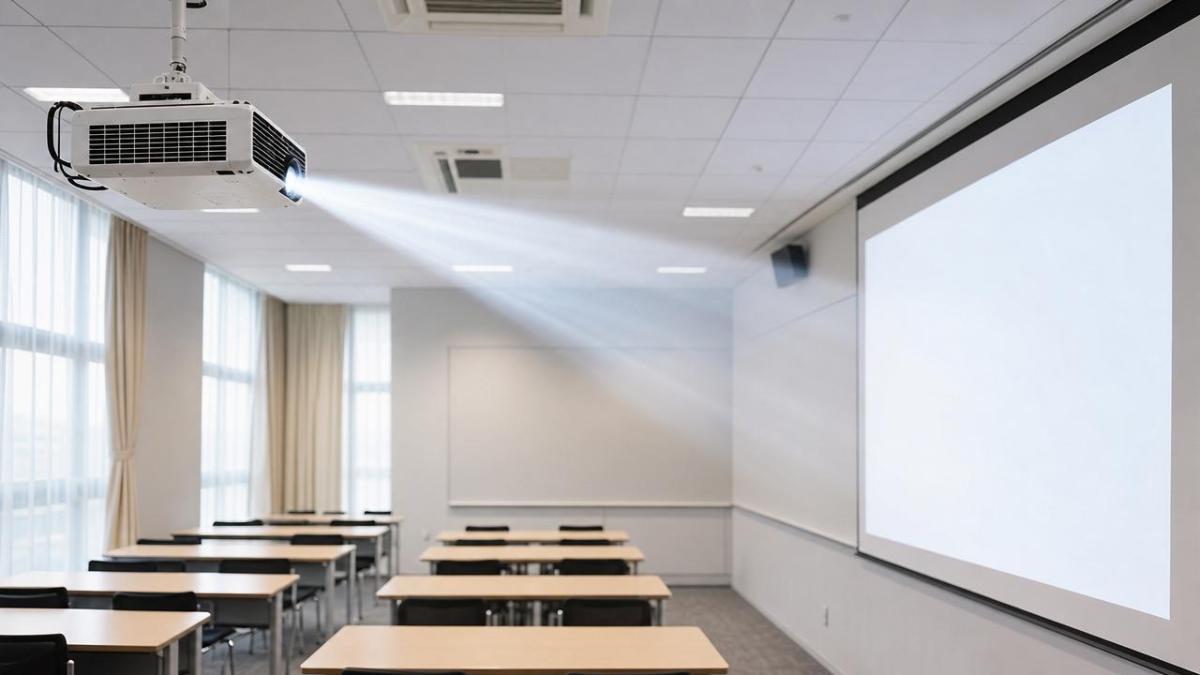
Brightness is usually the first specification reviewed, but lumen numbers alone can be misleading.
Classroom projectors must match screen size, lighting conditions, content type, and viewing distance.
A dim room may work with 3,000 lumens, while a bright classroom often needs 4,000 to 5,000 lumens.
Large lecture spaces may require stronger projectors, especially when curtains are unavailable.
Brightness should be checked against actual use, not only ideal laboratory conditions.
Text-heavy lessons need sharper visibility than casual video playback.
Charts, spreadsheets, engineering diagrams, and scientific content lose value when contrast is weak.
For classroom projectors, brightness consistency matters across the full image area.
A center-bright image with weak corners can cause eye strain during long sessions.
It is also useful to compare white brightness and color brightness.
Some projectors look strong on white slides but weaker on colored graphics.
How should throw distance be checked before installation?
Throw distance determines where projectors must be placed to create the required image size.
This check is essential before ceiling mounting, wall mounting, or replacing older equipment.
A standard throw model may fit long classrooms, but not compact rooms.
Short throw projectors reduce shadows and glare near the presentation area.
Ultra-short throw models are useful when the projector must sit very close to the screen.
However, ultra-short throw projectors require flatter walls and more precise alignment.
Small surface imperfections can distort the image.
Before purchase, confirm the throw ratio, screen width, mounting height, and cable route.
The throw ratio shows how far projectors sit from the screen compared with image width.
A model with a 1.5:1 throw ratio needs 3 meters for a 2-meter-wide image.
Lens shift, keystone correction, and zoom range also affect installation flexibility.
Optical lens shift is usually preferable because it preserves image quality better than digital correction.
Which display technology works best for learning spaces?
Classroom projectors commonly use LCD, DLP, laser, or lamp-based designs.
Each technology has advantages, limitations, and cost implications.
LCD projectors often deliver strong color brightness and clear presentation visuals.
They are practical for slides, charts, mixed media, and general classroom content.
DLP projectors are often compact and can provide sharp motion performance.
Some viewers may notice rainbow effects on certain DLP models.
Laser projectors reduce maintenance because they do not need regular lamp replacement.
They often maintain brightness better over time than lamp models.
Lamp projectors may have a lower purchase price, but replacement lamps add lifecycle cost.
When comparing projectors, the useful question is not only technology type.
It is whether the technology fits usage hours, maintenance capacity, image expectations, and budget control.
What total cost factors are often missed?
The purchase price is only one part of the real cost of classroom projectors.
A lower-cost unit can become expensive if lamps, filters, downtime, or service calls increase.
Total cost should include mounting hardware, cabling, screens, network modules, and installation labor.
Energy use also matters when many projectors operate across a campus or training network.
Laser models usually cost more upfront but may reduce maintenance over several years.
Lamp models may suit low-hour rooms, backup spaces, or budget-limited deployments.
Warranty coverage deserves careful reading.
Check light source coverage, onsite service options, replacement timelines, and exclusion clauses.
For projectors used daily, downtime can cost more than a replacement part.
A practical cost review compares three-year or five-year ownership, not only initial purchase.
How do connectivity and control features affect daily use?
Classroom projectors must connect reliably with laptops, document cameras, media players, and learning systems.
HDMI remains essential, but USB-C is increasingly useful for modern devices.
Wireless projection can improve flexibility, although network stability must be tested.
A classroom projector with multiple inputs reduces adapter problems and lesson delays.
Audio output should also be checked.
Built-in speakers may be enough for small rooms, but larger rooms need external sound.
Network management can simplify monitoring when many projectors are installed.
Remote power control, usage tracking, error alerts, and firmware updates reduce manual inspection work.
Security features are also relevant in shared buildings.
Password controls, lock slots, and asset labels help protect projectors from misuse or loss.
What mistakes should be avoided when sourcing projectors?
One common mistake is selecting projectors only by the highest lumen rating within budget.
Excess brightness can raise cost without improving learning visibility in controlled rooms.
Another mistake is ignoring installation geometry.
A projector with the wrong throw ratio may require new mounts or cable changes.
Resolution is also important.
WXGA may suit basic slides, while Full HD improves detailed diagrams and video content.
For design, medical, technical, or engineering instruction, higher clarity may justify additional cost.
Noise level should not be overlooked.
Loud fans can distract small classrooms, language labs, and quiet training spaces.
Supplier documentation should include datasheets, warranty terms, certification details, and installation guidance.
Reliable projectors are easier to approve when specifications are complete and verifiable.
Classroom projectors FAQ and decision checklist
Quick pre-purchase review
- Confirm the real classroom lighting level during typical use.
- Measure throw distance before comparing projectors.
- Check brightness, resolution, contrast, and color performance together.
- Compare lamp and laser ownership costs.
- Review warranty, service response, and spare part availability.
- Verify input ports, network control, and audio integration.
Final guidance for reliable classroom projector selection
Good classroom projectors are selected through fit, not specification inflation.
Brightness must match real room conditions, while throw distance must match physical installation limits.
Technology choice should reflect operating hours, maintenance expectations, and image quality needs.
Cost checks should include ownership expenses, not only the invoice price.
Before sourcing projectors, document room size, lighting, screen dimensions, mounting points, and connectivity requirements.
Then compare verified specifications, service terms, and lifecycle costs side by side.
A structured review reduces compatibility risk and supports consistent visual performance across learning environments.
For broader sourcing decisions, GTIIN emphasizes verified trade intelligence, technical clarity, and practical comparison frameworks.
 When dual sourcing makes sense in a sourcing strategy for manufacturersSourcing strategy for manufacturers: learn when dual sourcing strengthens supply continuity, reduces disruption risk, and protects production without adding unnecessary complexity.
 How bulk commodities pricing affects long-term supply contractsBulk commodities pricing shapes long-term supply contracts through index rules, freight, quality, volume, and currency risk. Explore strategies for resilient costs and supply security.
 Which global manufacturing trends by sector matter most for sourcing plans?Global manufacturing trends by sector: identify sourcing risks, supplier resilience, compliance demands, and cost drivers to build smarter, more reliable procurement plans.
 What industrial trade intelligence pricing should include before you subscribeIndustrial trade intelligence pricing explained: compare coverage, data quality, access rights, and workflow value before choosing a subscription that supports smarter trade decisions.
 How an industrial trade intelligence dashboard can identify new supplier marketsDiscover how an industrial trade intelligence dashboard helps identify new supplier markets by comparing capacity, landed cost, logistics resilience, and compliance risk.
 Which global market entry barriers should exporters assess first?Global market entry barriers exporters should assess first: tariffs, compliance, buyer qualification, logistics, and payment risk. Build a practical strategy for confident market entry.
 How trade data aggregation analytics can reveal emerging supplier marketsTrade data aggregation analytics reveals emerging supplier markets by connecting trade flows, capacity signals, logistics, and compliance insights for smarter sourcing decisions.
 When an export market analysis platform can validate demand in a new marketExport market analysis platform insights help validate new-market demand through buyer fit, regulations, logistics, competition, and profitable entry conditions.
 What is driving the beauty and personal care market in the USA?Beauty and personal care in USA is driven by targeted solutions, selective premiumization, digital discovery, clean-label trust, diverse needs, and compliance. Explore key growth opportunities.
 How trade flow monitoring reports reveal changing regional demandTrade flow monitoring reports reveal changing regional demand through import volumes, sourcing shifts, product mix, logistics signals, and regulatory trends. Explore actionable market insights.
 How international market intelligence for investors reduces market-entry riskInternational market intelligence for investors reduces market-entry risk by validating demand, regulations, logistics, and competition before capital is committed.
 How international sourcing intelligence helps identify supplier risk earlyInternational sourcing intelligence helps businesses spot supplier risks early, protect supply continuity, and make smarter global procurement decisions.
 How trade data aggregation analytics reveals emerging supplier marketsTrade data aggregation analytics reveals emerging supplier markets through export trends, input flows, logistics, and regulatory signals. Discover smarter sourcing insights.
 What industrial cluster monitoring in Vietnam reveals about site riskIndustrial cluster monitoring Vietnam reveals hidden site risks across labor, utilities, logistics, compliance, and supplier dependencies. Make smarter sourcing and expansion decisions.
 Food Technology Trends Reshaping Shelf Life, Safety, and Product InnovationFood technology is reshaping shelf life, safety, and innovation. Discover the trends helping food businesses cut risk, improve compliance, and unlock stronger global market growth.
 How electronics manufacturing services are changing with low-volume demandElectronics manufacturing services are evolving fast with low-volume demand. Learn how agile EMS partners improve flexibility, compliance, sourcing resilience, and speed to market.
 How Can Buyers Reduce Procurement Risks for Electronic Components?How to reduce procurement risks for electronic components: learn how buyers assess traceability, lead times, compliance, and supplier types to avoid costly sourcing mistakes.
 What Sourcing Intelligence India Reveals About Supplier Risk and Cost ShiftsSourcing intelligence India reveals hidden supplier risk, compliance gaps, logistics pressure, and real cost shifts—helping buyers compare vendors smarter and source with more confidence.
 Fashion Trends 2026: Which Materials, Colors, and Silhouettes Are Gaining Ground?Fashion trends 2026 spotlight tactile fabrics, mineral colors, and controlled volume. Explore the materials, shades, and silhouettes shaping smarter, more wearable style.
 Smart Device Market Outlook: Key Growth Drivers, Segments, and Business OpportunitiesSmart device market trends are shifting toward system value, industrial demand, and resilient supply chains. Explore key growth drivers, high-potential segments, and business opportunities.
 How Global Trade Intelligence Services Help B2B Firms Evaluate Markets and SuppliersGlobal trade intelligence services help B2B firms compare suppliers, assess market potential, and uncover compliance, logistics, and pricing risks before costly decisions are made.















Global Trade Insights & Industry
Our mission is to empower global exporters and importers with data-driven insights that foster strategic growth.
Search News
Popular Tags
Industry Overview
The global commercial kitchen equipment market is projected to reach $112 billion by 2027. Driven by urbanization, the rise of e-commerce food delivery, and strict hygiene regulations.