

How to compare ergonomic office furniture for all-day use
Choosing ergonomic office furniture for all-day use is about more than comfort—it directly affects posture, focus, and long-term productivity. For users comparing chairs, desks, and support accessories, understanding key differences in adjustability, material quality, and body support can make the selection process far more effective. This guide explains how to compare ergonomic office furniture with confidence and choose options that truly fit daily work demands.
For operators, remote staff, administrative teams, designers, analysts, and customer service users who stay seated for 6 to 10 hours a day, the wrong setup often leads to neck strain, wrist pressure, lower-back fatigue, and avoidable loss of concentration. In B2B office supply purchasing, comparing ergonomic office furniture should therefore focus on measurable fit, daily usability, maintenance needs, and long-term value rather than appearance alone.
A practical comparison method helps users and procurement teams align product features with real workstation demands. Whether the goal is equipping a 20-person office, upgrading a home-based work fleet, or standardizing operator seating in a shared workspace, the same principles apply: support the body correctly, allow adjustment in key zones, and match furniture dimensions to the way work is actually performed.
What ergonomic office furniture should do during a full workday
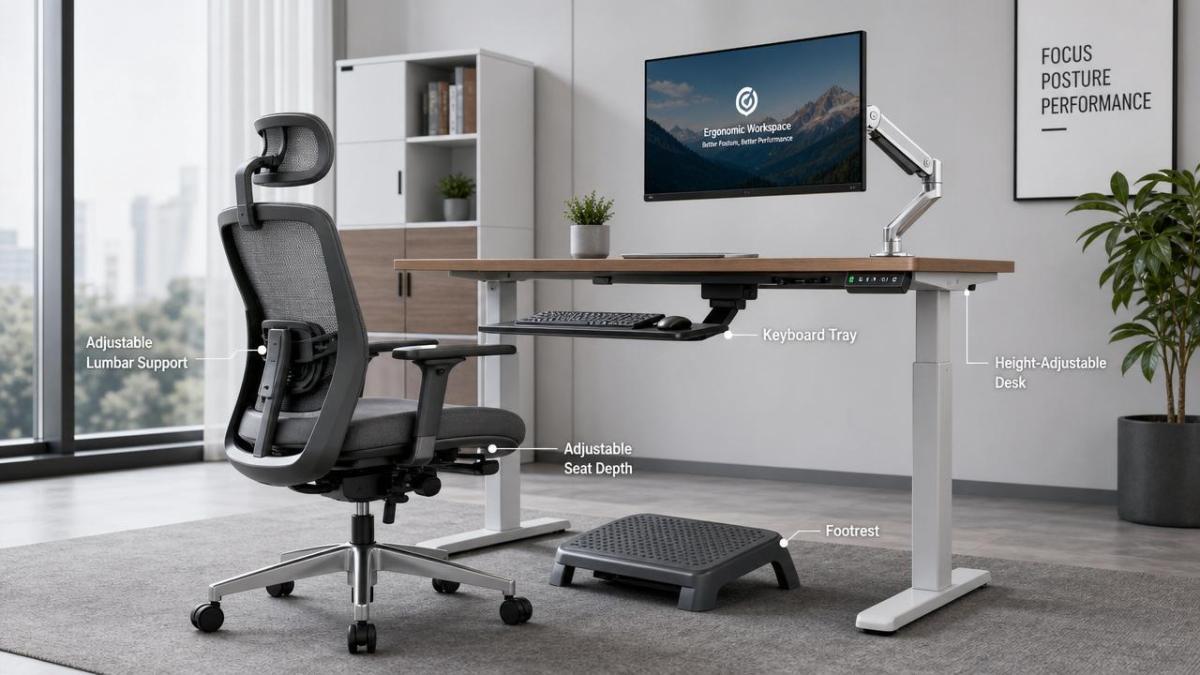
Before comparing models, users need a clear definition of performance. Ergonomic office furniture is designed to help maintain neutral body posture for extended work periods, usually in sessions of 2 to 4 hours at a time with short movement breaks in between. The main categories include ergonomic chairs, sit-stand desks, monitor supports, keyboard trays, footrests, and lumbar accessories.
A product is not truly ergonomic just because it has padding or a modern silhouette. For all-day use, it should support at least 4 critical body zones: lower back, shoulders, forearms, and hips. It should also adapt to user height, desk task, and screen position without forcing awkward reaching, slouching, or fixed posture for long periods.
Core outcomes to compare
- Posture support across 6 to 8 working hours
- Adjustment range for users of different heights, often from about 150 cm to 190 cm
- Pressure distribution in the seat, backrest, and arm support areas
- Ease of movement between typing, reading, calls, and collaborative tasks
- Durability under repeated daily use, especially in shared office environments
Why all-day use requires closer comparison
A chair that feels acceptable for 30 minutes may become uncomfortable after 3 hours. A desk that looks spacious may still position the keyboard too high for relaxed shoulders. Users often overlook these issues during quick showroom checks, which is why a structured comparison of ergonomic office furniture is more reliable than first impressions.
In office supplies procurement, even small ergonomic mismatches can scale into recurring complaints, lower user acceptance, and replacement costs within 12 to 24 months. Looking at fit, adjustment, and support in a systematic way reduces that risk.
How to compare ergonomic chairs, desks, and accessories
The best comparison process breaks the category into separate product functions. Users should not judge a chair by the same criteria as a desk or monitor arm. Each item affects a different movement pattern and requires different measurements. The table below shows a practical side-by-side framework for comparing ergonomic office furniture used throughout the day.
This comparison shows why a single feature list is not enough. Effective ergonomic office furniture selection depends on function-specific measurements. Chairs must support micro-adjustments, desks must adapt to body height and equipment load, and accessories must correct viewing and reach angles without adding clutter.
Chair comparison points that matter most
1. Seat height and depth
Seat height should allow feet to rest flat with knees near a 90 to 100 degree angle. Seat depth should leave roughly 2 to 5 cm between the seat edge and the back of the knees. If the seat is too deep, shorter users lose back support. If too shallow, thigh support drops and pressure increases.
2. Lumbar support adjustability
A fixed back curve may suit one user and fail another. Good all-day chairs usually provide height-adjustable lumbar support, and some also allow depth adjustment. For shared workstations, this feature becomes more important because multiple users may rotate through the same seat during a 5-day workweek.
3. Armrest flexibility
Armrests should not push shoulders upward or force elbows outward. Look for at least height adjustment, and ideally 3D or 4D movement that allows inward, outward, forward, and backward positioning. This is especially helpful for typing-intensive roles and tasks involving frequent mouse use.
4. Backrest and recline behavior
Recline is not only about relaxation. A controlled tilt mechanism lets users shift load during long sessions and helps reduce static spinal pressure. Compare tension adjustability, lock positions, and whether the chair remains stable when leaning back for 10 to 20 minutes during reading or calls.
Desk comparison points for all-day operation
For desk users, the ideal height depends on elbow position, monitor placement, and task type. Fixed desks can work if matched correctly, but sit-stand models offer more flexibility in mixed-use environments. When comparing ergonomic office furniture, desk height range is one of the most practical numbers to verify.
- Check height range against the shortest and tallest intended users.
- Verify load capacity if dual monitors, docking stations, or desktop equipment are used.
- Review stability at maximum height, especially above 110 cm.
- Consider noise level and lifting speed for open-plan offices.
A sit-stand desk with memory presets can improve usability because users switch positions faster when controls are simple. In practice, 2 to 4 stored positions are often enough for daily use. Stability is equally important, since monitor wobble can reduce visual comfort and discourage standing sessions.
Accessory comparison points users often ignore
Accessories are sometimes treated as optional extras, but they can solve the final 10% to 20% of fit issues that a chair or desk alone cannot correct. For example, a monitor riser can reduce neck flexion, while a footrest supports shorter users when desk height cannot be lowered enough.
When reviewing accessories, users should check compatibility first. A monitor arm needs enough desk thickness and edge clearance. A keyboard tray needs legroom. A footrest should not slide on hard flooring. These details have a direct effect on real usability.
Materials, build quality, and durability signals
All-day ergonomic office furniture must perform consistently, not just look refined at delivery. Materials influence temperature control, pressure distribution, cleaning effort, and lifespan. In B2B office environments, durability matters even more when the furniture is used 5 to 7 days per week by multiple operators.
Mesh backs can improve airflow in warm climates or densely occupied offices. Foam seats may feel softer at first, but the foam density and resilience determine whether support remains stable after 12 months of use. Metal desk frames typically offer better long-term rigidity than lighter structures when supporting 2 monitors and frequent height changes.
A practical material comparison table
The table below helps users compare common material choices in ergonomic office furniture based on operating conditions rather than marketing language.
The key takeaway is that comfort and durability must be assessed together. Softness alone is not a reliable quality signal. For daily operators, the better product is usually the one that maintains support, stays stable under repeated movement, and remains easy to clean over long usage cycles.
Signs of stronger build quality
- Adjustment controls move smoothly without sticking or excessive looseness.
- Casters roll consistently across carpet or hard flooring.
- Armrests do not wobble under normal leaning pressure.
- Desk frames remain steady during typing at standing height.
- Surfaces resist frequent cleaning and minor abrasion from office equipment.
Fit, testing, and user-based evaluation before purchase
The most effective way to compare ergonomic office furniture is to test it against actual work behavior. A product that performs well in a catalog can still fail in use if the seat edge cuts into the thighs, the desk frame limits leg movement, or monitor support cannot align with screen height.
If possible, users should evaluate furniture through a 15 to 30 minute seated trial, a 10 minute standing trial for height-adjustable desks, and at least 3 task types such as typing, reading, and video calls. For team purchasing, short pilot use by 3 to 5 users often reveals issues that specification sheets miss.
A 6-point user test checklist
- Feet remain supported and stable without leg compression.
- Lower back stays in contact with backrest during typing.
- Shoulders remain relaxed while forearms are supported.
- Screen height avoids repeated neck flexion.
- Standing desk transitions feel smooth and practical.
- Adjustment controls are easy enough for daily use without training.
Common mistakes during comparison
Buying for style before function
Visual appeal matters in office environments, but all-day furniture should be judged first by support and adaptability. A minimal chair with limited adjustment may suit a meeting room, not a workstation used 8 hours a day.
Ignoring user size diversity
A single standard setup rarely fits every user. Offices with mixed user heights should compare adjustment ranges carefully and may need more than one chair or desk specification. This is especially relevant in shared seating arrangements and multi-shift operator spaces.
Overlooking maintenance and replacement parts
In higher-use environments, wear parts such as casters, arm pads, gas lifts, and control switches matter. Easy replacement can extend usable life and lower lifecycle cost over 2 to 5 years.
Procurement guidance for office users and supply decision-makers
For organizations sourcing ergonomic office furniture, comparing unit price alone is rarely enough. Better decisions come from balancing user fit, durability, after-sales practicality, and the ability to standardize across departments. This is where office supply buyers and end users should align requirements early.
A useful procurement framework includes 4 decision layers: ergonomic fit, product consistency, delivery readiness, and service support. If a supplier can explain adjustment logic, material differences, usage scenarios, and maintenance expectations clearly, buyers gain a more dependable basis for selection.
What to ask before placing an order
- Which user height range does the chair or desk realistically support?
- What components receive the most daily wear, and are replacements available?
- What is the usual lead time for standard orders, such as 2 to 4 weeks?
- Can the supplier recommend matching accessories for monitors, wrists, and foot support?
- Is assembly simple enough for onsite office teams or does it require installation support?
For global buyers, access to reliable product comparison content and market intelligence also matters. Platforms such as GTIIN and TradeVantage help businesses track office supply developments, evaluate positioning across international sourcing channels, and strengthen supplier discovery with industry-focused information that supports better purchasing decisions.
Comparing ergonomic office furniture for all-day use comes down to one principle: the furniture should fit the user, the task, and the work cycle at the same time. Chairs need real adjustability, desks need stable height flexibility, and accessories need to solve alignment gaps that affect comfort over 6 to 10 hours of work.
When users and procurement teams evaluate measurements, materials, support zones, and long-term usability together, they make more confident choices and reduce the risk of underperforming office setups. If you are reviewing ergonomic office furniture options for your workspace or sourcing plan, contact us to explore tailored office supply insights, compare suitable solutions, and learn more about practical product selection strategies.
 How an industrial trade intelligence dashboard can identify new supplier marketsDiscover how an industrial trade intelligence dashboard helps identify new supplier markets by comparing capacity, landed cost, logistics resilience, and compliance risk.
 Which global market entry barriers should exporters assess first?Global market entry barriers exporters should assess first: tariffs, compliance, buyer qualification, logistics, and payment risk. Build a practical strategy for confident market entry.
 How trade data aggregation analytics can reveal emerging supplier marketsTrade data aggregation analytics reveals emerging supplier markets by connecting trade flows, capacity signals, logistics, and compliance insights for smarter sourcing decisions.
 When an export market analysis platform can validate demand in a new marketExport market analysis platform insights help validate new-market demand through buyer fit, regulations, logistics, competition, and profitable entry conditions.
 What is driving the beauty and personal care market in the USA?Beauty and personal care in USA is driven by targeted solutions, selective premiumization, digital discovery, clean-label trust, diverse needs, and compliance. Explore key growth opportunities.
 How trade flow monitoring reports reveal changing regional demandTrade flow monitoring reports reveal changing regional demand through import volumes, sourcing shifts, product mix, logistics signals, and regulatory trends. Explore actionable market insights.
 How international market intelligence for investors reduces market-entry riskInternational market intelligence for investors reduces market-entry risk by validating demand, regulations, logistics, and competition before capital is committed.
 How international sourcing intelligence helps identify supplier risk earlyInternational sourcing intelligence helps businesses spot supplier risks early, protect supply continuity, and make smarter global procurement decisions.
 How trade data aggregation analytics reveals emerging supplier marketsTrade data aggregation analytics reveals emerging supplier markets through export trends, input flows, logistics, and regulatory signals. Discover smarter sourcing insights.
 What industrial cluster monitoring in Vietnam reveals about site riskIndustrial cluster monitoring Vietnam reveals hidden site risks across labor, utilities, logistics, compliance, and supplier dependencies. Make smarter sourcing and expansion decisions.
 Food Technology Trends Reshaping Shelf Life, Safety, and Product InnovationFood technology is reshaping shelf life, safety, and innovation. Discover the trends helping food businesses cut risk, improve compliance, and unlock stronger global market growth.
 How electronics manufacturing services are changing with low-volume demandElectronics manufacturing services are evolving fast with low-volume demand. Learn how agile EMS partners improve flexibility, compliance, sourcing resilience, and speed to market.
 How Can Buyers Reduce Procurement Risks for Electronic Components?How to reduce procurement risks for electronic components: learn how buyers assess traceability, lead times, compliance, and supplier types to avoid costly sourcing mistakes.
 What Sourcing Intelligence India Reveals About Supplier Risk and Cost ShiftsSourcing intelligence India reveals hidden supplier risk, compliance gaps, logistics pressure, and real cost shifts—helping buyers compare vendors smarter and source with more confidence.
 Fashion Trends 2026: Which Materials, Colors, and Silhouettes Are Gaining Ground?Fashion trends 2026 spotlight tactile fabrics, mineral colors, and controlled volume. Explore the materials, shades, and silhouettes shaping smarter, more wearable style.
 Smart Device Market Outlook: Key Growth Drivers, Segments, and Business OpportunitiesSmart device market trends are shifting toward system value, industrial demand, and resilient supply chains. Explore key growth drivers, high-potential segments, and business opportunities.
 How Global Trade Intelligence Services Help B2B Firms Evaluate Markets and SuppliersGlobal trade intelligence services help B2B firms compare suppliers, assess market potential, and uncover compliance, logistics, and pricing risks before costly decisions are made.
 Manufacturing Sector Updates for Investors: What Signals Matter Most in 2025?Manufacturing sector updates for investors in 2025: track orders, margins, supply chains, regulation, and exports to spot resilient manufacturers and smarter investment signals.
 How Energy Market Intelligence Helps Businesses Track Price Risks and Demand ShiftsEnergy market intelligence helps businesses spot price risks, demand shifts, and supply pressure early—improving procurement, resilience, and faster strategic decisions.
 Precision Hardware Tools Market: Key Demand Drivers, Segments, and Growth OutlookPrecision hardware tools market trends are reshaping sourcing, compliance, and automation. Explore key demand drivers, segment shifts, regional supply patterns, and growth opportunities.
 How to Use Customs Import Data to Find Buyers, Track Competitors, and Spot Demand?Customs import data helps you find real buyers, track competitors, and spot demand shifts early. Learn practical ways to turn trade records into smarter global business decisions.















Global Trade Insights & Industry
Our mission is to empower global exporters and importers with data-driven insights that foster strategic growth.
Search News
Popular Tags
Industry Overview
The global commercial kitchen equipment market is projected to reach $112 billion by 2027. Driven by urbanization, the rise of e-commerce food delivery, and strict hygiene regulations.